If you’ve been stuck with a cringeworthy Gmail address from your teenage years or just an old username that no longer fits who you are professionally, Google finally has good news for you. Gmail users can now change their email address and it’s kind of a big deal.
After 22 years, Google is rolling out the ability for U.S. users to update their Gmail username without losing a single email, contact, or piece of account history. That’s right, no more starting from scratch, no more awkward workarounds, and no more juggling multiple accounts just because you outgrew your old one.
Why This Gmail Update Is a Big Deal
For over two decades, Gmail offered no real solution if you wanted a fresh username. Your only option was to create a brand-new account and go through the tedious process of manually transferring your data, which often broke integrations with third-party apps and left you managing two inboxes indefinitely.
Millions of people found themselves stuck with email addresses they chose as teenagers, addresses that had become embarrassing, outdated, or just unprofessional as they moved into their careers. Google quietly began testing this feature in select markets late last year before announcing the wider U.S. rollout this week.
What Happens to Your Old Gmail Address After You Switch
This is the part that makes the update genuinely impressive. When you change your Gmail address, your old one doesn’t just vanish into the void. It automatically becomes an alias tied to your account. Here’s what that means in practice:
- Emails sent to your old address still land in your inbox. Nothing gets lost.
- You can still send emails from your old address if needed.
- Your old address still works as a sign-in option for your Google Account.
The one caveat Google mentions is that your old address “won’t be immediately reflected in older instances”. For example, Google Calendar events created before the change may still display your previous username. That’s a minor inconvenience, but it’s worth knowing upfront.
Gmail Address Change Rules You Should Know First
Before you rush off to change your Gmail username, here are the key limitations Google has put in place:
- You can change your username up to three times total four usernames counting your original.
- You’re limited to one change per year (every 12 months).
- If you revert to a previous username, there’s a 30-day cooldown before you can make another change.
- Once a new username is created, you cannot delete it.
- You can switch back to an older username at any time, as long as you’re within your allowed changes.
These guardrails make sense, they prevent abuse while still giving users real flexibility to update their digital identity over time. If privacy is also a concern, you might want to check out how to turn off Gemini in Gmail.
How to Change Your Gmail Address
The process is simple once the feature is enabled on your account. Here’s exactly how to do it:
- Sign into your Gmail account, then click your profile picture in the top-right corner of the screen.
- Select Manage your Google Account from the dropdown menu.
- In the left-hand navigation, click Personal info, then select Email.
- Under the Google Account email section, tap Change Google Account email. If your account has access to this feature, you’ll see a pencil (edit) icon next to your current Gmail address.
- Enter your account password and complete any two–step verification prompts to proceed.
- Type in your desired new username. Google checks availability in real time, so you’ll know immediately if it’s taken.
- Save your new address. The change applies instantly across Gmail and all connected Google services.
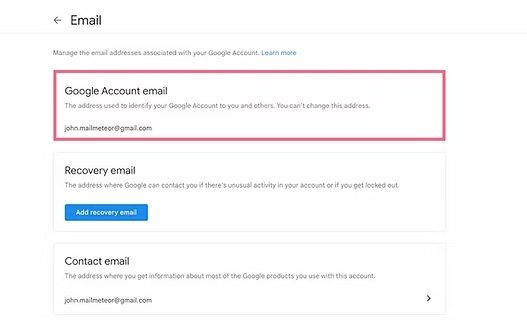
Once the switch is made, your old Gmail address automatically becomes an alias, and your account keeps working exactly as it always has just with a fresh new name attached to it.
Still Don’t See the Option?
If you’re not seeing the pencil icon next to your Gmail address, don’t panic. Google is rolling this feature out gradually across the U.S., so it may not have reached your account just yet. Keep checking back, it should become available to all eligible U.S. users in the coming weeks.
No. All your emails, Drive files, contacts, and Photos stay intact. Your old address becomes an alias, so mail sent to it still reaches your inbox. The only minor exception is that older entries like pre-existing Calendar events may still show your previous username for a while.
Yes, you can switch back at any time, provided you haven’t used up your allowed changes or exceeded the one-change-per-year limit. Just note that reverting triggers a 30-day cooldown before you can make another change, so it’s worth being sure before you commit.
Not yet. Google is rolling it out gradually to U.S. users. If it’s live on your account, you’ll see a pencil (edit) icon next to your Gmail address under Personal info in your Google Account settings. If it’s not there yet, sit tight — it should reach your account within a few days or weeks.