Telegram is fast, secure, and highly customizable, but you might want to delete your account if you’re switching apps, taking a break, or concerned about privacy. Uninstalling the app won’t delete your data; you need to follow Telegram’s official steps.
This guide shows you how to permanently delete your Telegram account, what happens afterward, and how to set it to auto-delete if you prefer a hands-off option.
Why Do People Delete Their Telegram Account?
Let’s be real, there are plenty of reasons why you might be ready to move on.
- Privacy Concerns: You might be looking for an app with different privacy policies or features.
- Digital Detox: Sometimes, the best way to reduce screen time is to remove the source of notifications altogether.
- Switching Platforms: Maybe your friends and family have all moved to a different messaging app, and you’re no longer using Telegram.
- Simplifying Your Life: You may want fewer accounts and apps to manage.
Whatever your reason, the decision to delete is permanent, so it’s important to be sure.
Important Things to Know Before Deleting Your Telegram Account
Before you proceed, here are the key points:
- It is PERMANENT: Once you delete your account, it cannot be restored. All your messages, media, contacts, and any other data associated with your account will be gone forever.
- You Lose Everything: This includes all your chat history, saved messages, and media files. Telegram does not offer a way to restore a deleted account.
- Export Your Data First: If you have important photos, videos, or chat logs, export them using Telegram Desktop before proceeding. You can find this option under Settings > Advanced > Export Telegram Data.
- Your Channels and Groups: If you are the sole creator and admin of a channel or group, that channel or group will be deleted along with your account. If there are other admins, control will be transferred to one of them. Your messages in groups you didn’t create will remain.
How to Delete Your Telegram Account (Desktop & Mobile)
Telegram requires you to use its official account deactivation page in a web browser.
The steps are the same on iPhone, Android, or desktop:
- Open a web browser (like Safari, Chrome, or Firefox) on your device.
- Go to Telegram’s official account deactivation page.
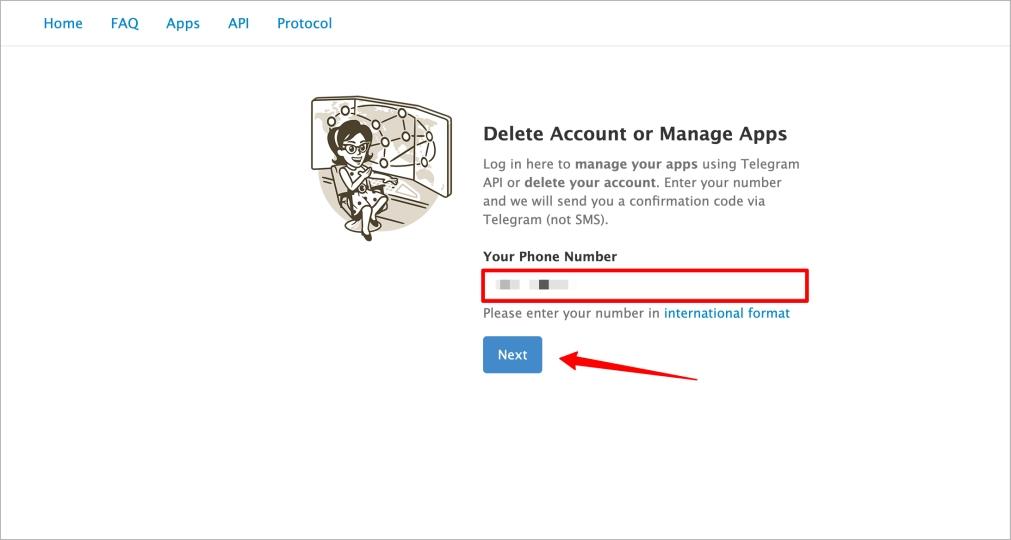
- Enter the phone number associated with your Telegram account in the international format (e.g., +1 for the US, +44 for the UK, +91 for India).
- Click Next. A unique confirmation code will be sent to you via Telegram, not via SMS.
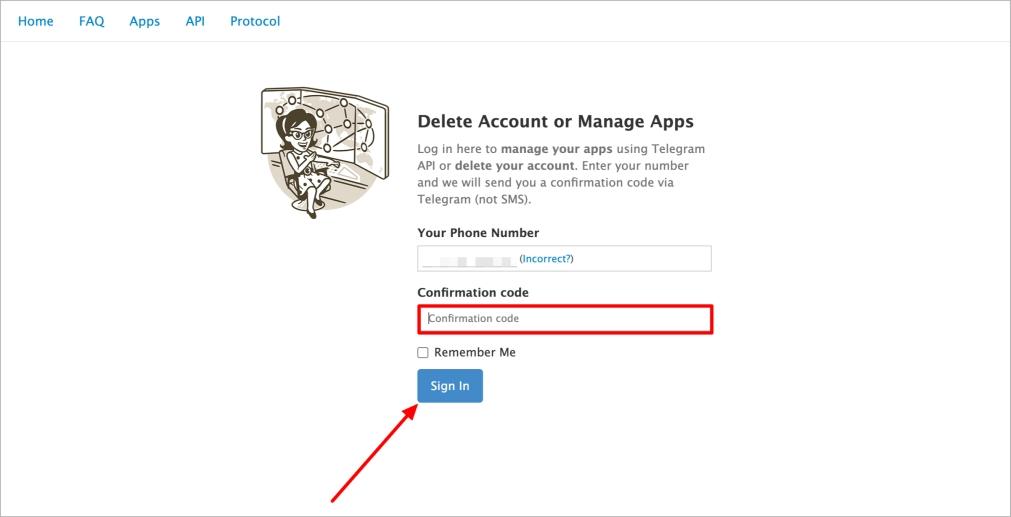
- Open the Telegram app, find the message from the Telegram service account, and copy the confirmation code.
- Go back to your web browser, paste the code into the “Confirmation code” field, and click Sign In.
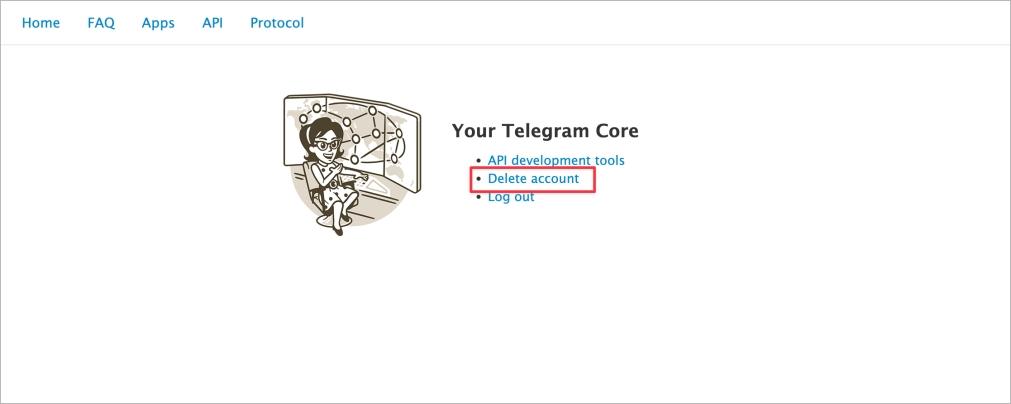
- You’ll see a page with different options. Select the Delete account option.
- The page will ask you why you are leaving. You can provide a reason or leave it blank. Click the “Delete My Account” button.

- A final confirmation pop-up will appear, warning you that the action is irreversible. Click the red “Yes, delete my account” button to confirm.

Your account and all associated data will be permanently deleted.
Also Check: How to Add Someone on Telegram Using a Username
How to Set Telegram to Auto-Delete After Inactivity
If you’d rather not manually delete your account, you can let it self-destruct: This is the only way to manage deletion from within the mobile app.
- Open the Telegram app and go to Settings.
- Tap Privacy and Security.
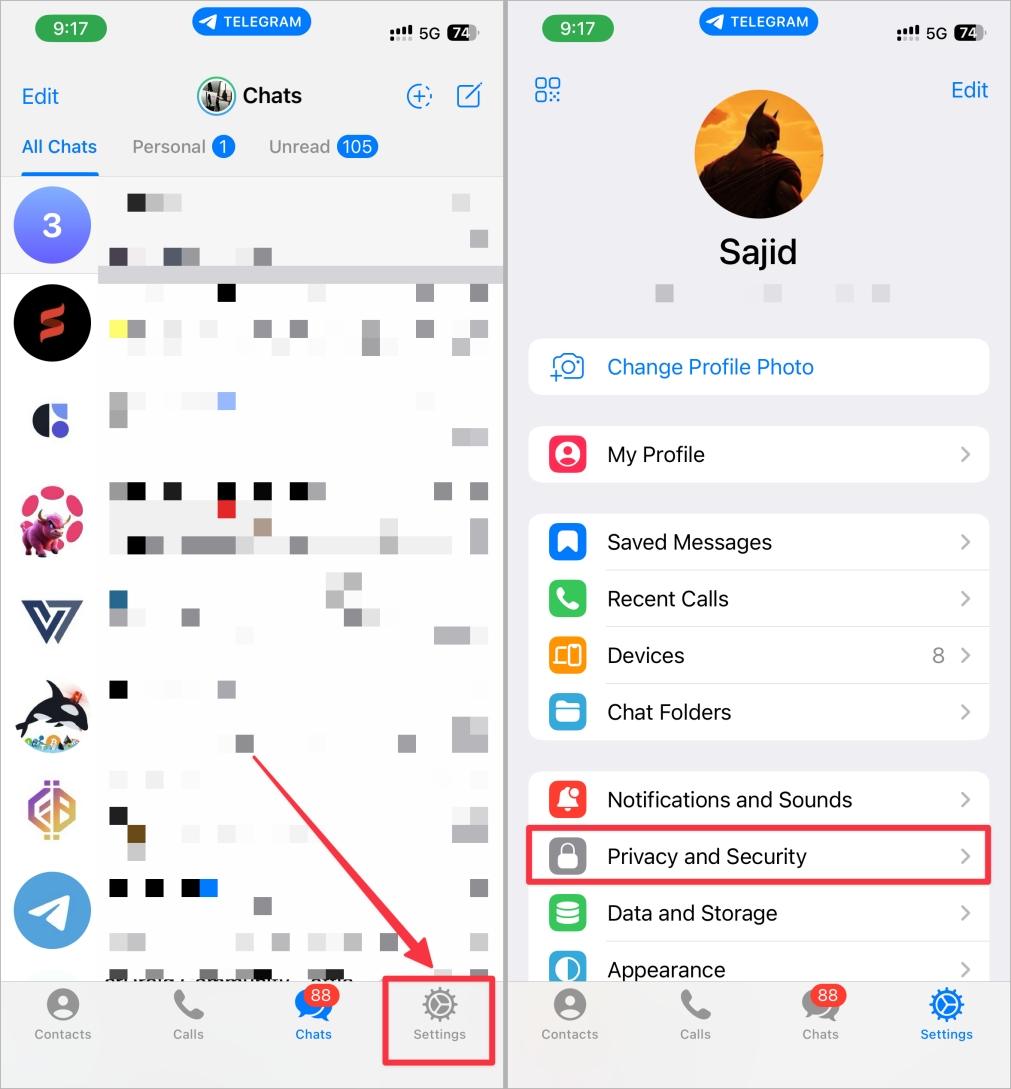
- Scroll down and tap Delete My Account If Away For… (on some versions, this may be under “Advanced“).
- Choose the inactivity period: 1 month, 3 months, 6 months, or 1 year.
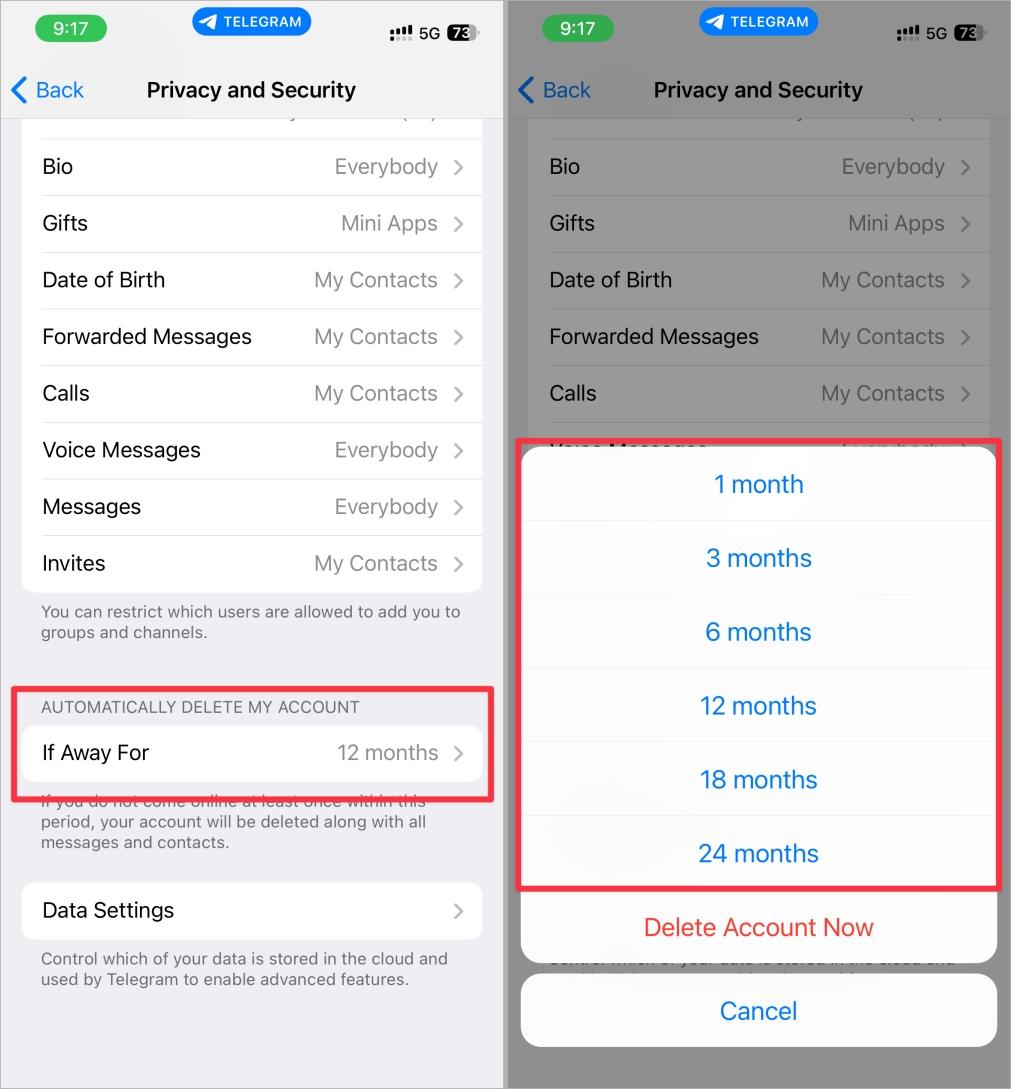
Once set, if you do not log in or show any activity on Telegram for that duration, your account and all its data will be automatically and permanently deleted.
Delete vs Deactivate Telegram Account: What’s the Difference?
Let’s make this simple: Telegram does not have a “deactivate” option like Facebook or Instagram. You cannot temporarily disable your account and come back later.
Deleting is the only option, and it is always permanent, whether you do it manually through the web portal or automatically with the self-destruct timer.
The closest thing to a “temporary” break is to set the self-destruct timer to a long period, like 1 year, and simply stop using the app.
Telegram Account Deletion Not Working? Common Issues & Fixes
- Didn’t receive the code?: This is the most common issue. Remember, the confirmation code is sent inside the app, from the official Telegram service account. If you’re unsure how to spot it, check our guide to Telegram icons and symbols so you don’t confuse it with other messages.
- “Invalid phone number” error: Make sure you enter your phone number in the correct international format, including “+” and your country code.
Final Thoughts
Deleting your Telegram account is a significant step, but it may be the right one for privacy, focus, or simplicity. Whether you go for manual deletion or set an auto-delete timer, the process is straightforward once you know where to look.
No. You must have access to the Telegram account associated with your phone number to receive the in-app confirmation code required to delete your account.
If you are the only admin in a group or channel you created, it will be deleted. If there are other admins, they will retain control. Your messages will remain in the groups you were a member of.
Yes, you can sign up for a new Telegram account with the same phone number after a short period. However, you will be a completely new user. None of your old chats, contacts, or data will be restored.
Once you confirm the deletion, the process begins immediately and is irreversible. It might take a short time for all your data to be fully purged from all of Telegram’s backups, but from a user perspective, it’s gone instantly.
No, Telegram does not offer a temporary deactivation feature. Your only options are permanent deletion or setting a long self-destruct timer.