There’s something quietly frustrating about modern workouts that nobody really talks about. You open one app for music, another for workouts, maybe a third for meditation, and somewhere in between, you lose momentum.
I’ve been there more times than I’d like to admit. Spotify seems to have noticed the same problem and decided to do something about it. With its new Fitness hub, the company is no longer just the soundtrack to your workout; it’s trying to become the entire experience.
And after spending some time exploring it, this isn’t just another feature rollout. It’s a meaningful shift in how Spotify wants to fit into your daily routine.
What’s Actually Inside the New Spotify Fitness Hub
At its core, the Fitness hub is about reducing friction.
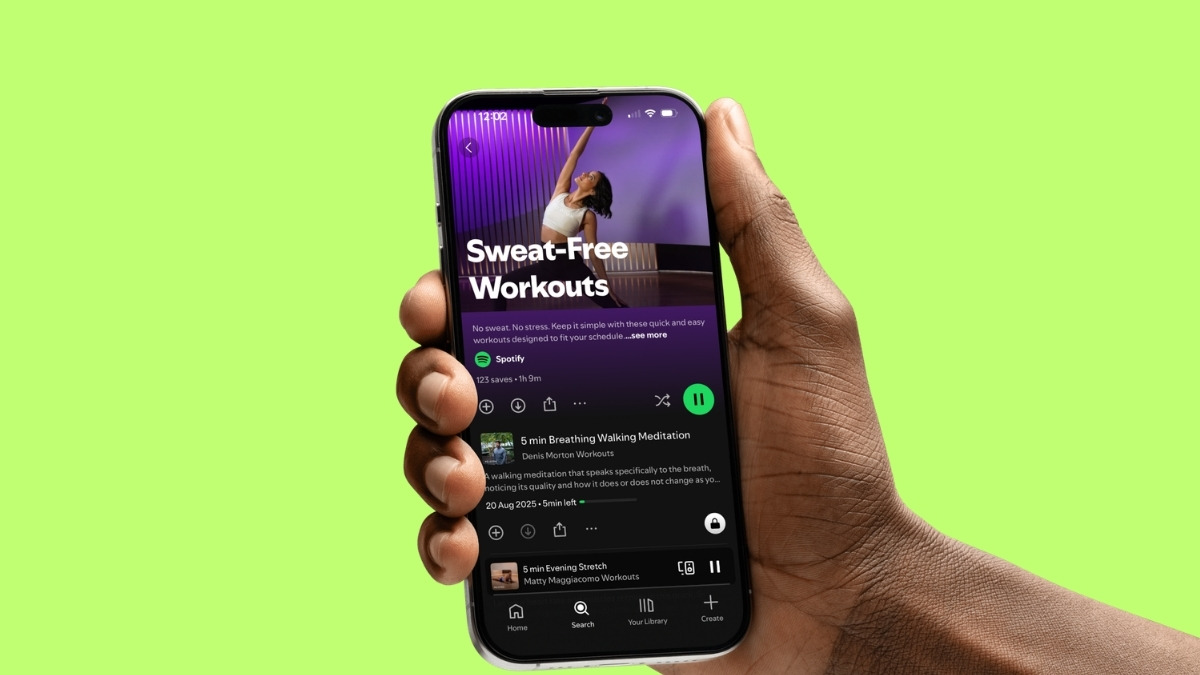
Instead of bouncing between apps, you now get workouts, playlists, guided sessions, and recovery content all in one place. And importantly, this isn’t locked behind a paywall entirely.
Both free and Premium users get access to curated workout playlists and content from creators like Yoga with Kassandra, Chloe Ting, Sweaty Studio, and Pilates Body by Raven. If you’ve ever relied on random YouTube searches for workouts, this already feels more structured.
From my experience, the difference here isn’t just content availability, it’s how it’s organized. You’re not just searching for workouts. You’re guided into them based on mood, intensity, or type.
Spotify Peloton Workouts: 1,400+ Classes
This is where things start to feel serious.
Through its partnership with Peloton, Spotify is now offering over 1,400 on-demand classes directly inside the app for Premium users. No additional subscription, no specialized equipment, and no need to invest in Peloton hardware.
That alone lowers the barrier significantly.
The classes cover everything from strength training and cardio to yoga, running, and meditation, led by well-known Peloton instructors like Rebecca Kennedy, Ally Love, and Rad Lopez.
What stood out to me is how accessible this feels. You don’t need to “commit” to a fitness ecosystem anymore. You just open Spotify and start.
And since it’s ad-free for Premium users, it doesn’t break your flow mid-session, which matters more than you realize once you’re actually working out.
Why Spotify Is Moving Into Fitness Now
This move didn’t come out of nowhere.
Spotify has quietly been a part of people’s workouts for years. The data just confirms it. Around 70% of Premium users already use Spotify during workouts, and over 150 million fitness playlists are actively in use.
That’s not casual listening. That’s behavior. So instead of letting users rely on multiple platforms, Spotify is consolidating that experience.
As Roman Wasenmüller, Spotify’s VP and Global Head of Podcasts, put it, listening was just the beginning. And honestly, that aligns with what this update feels like. Spotify is no longer just supporting your habits, it’s trying to own them.
How to Access the Spotify Fitness Hub
Getting started is simple, but knowing where to look saves time.
- Open Spotify on your phone, desktop, or TV.
- Search for “fitness”.
- Tap into the Fitness hub or find it under Browse All.
- Explore by workout type, instructor, or mood.
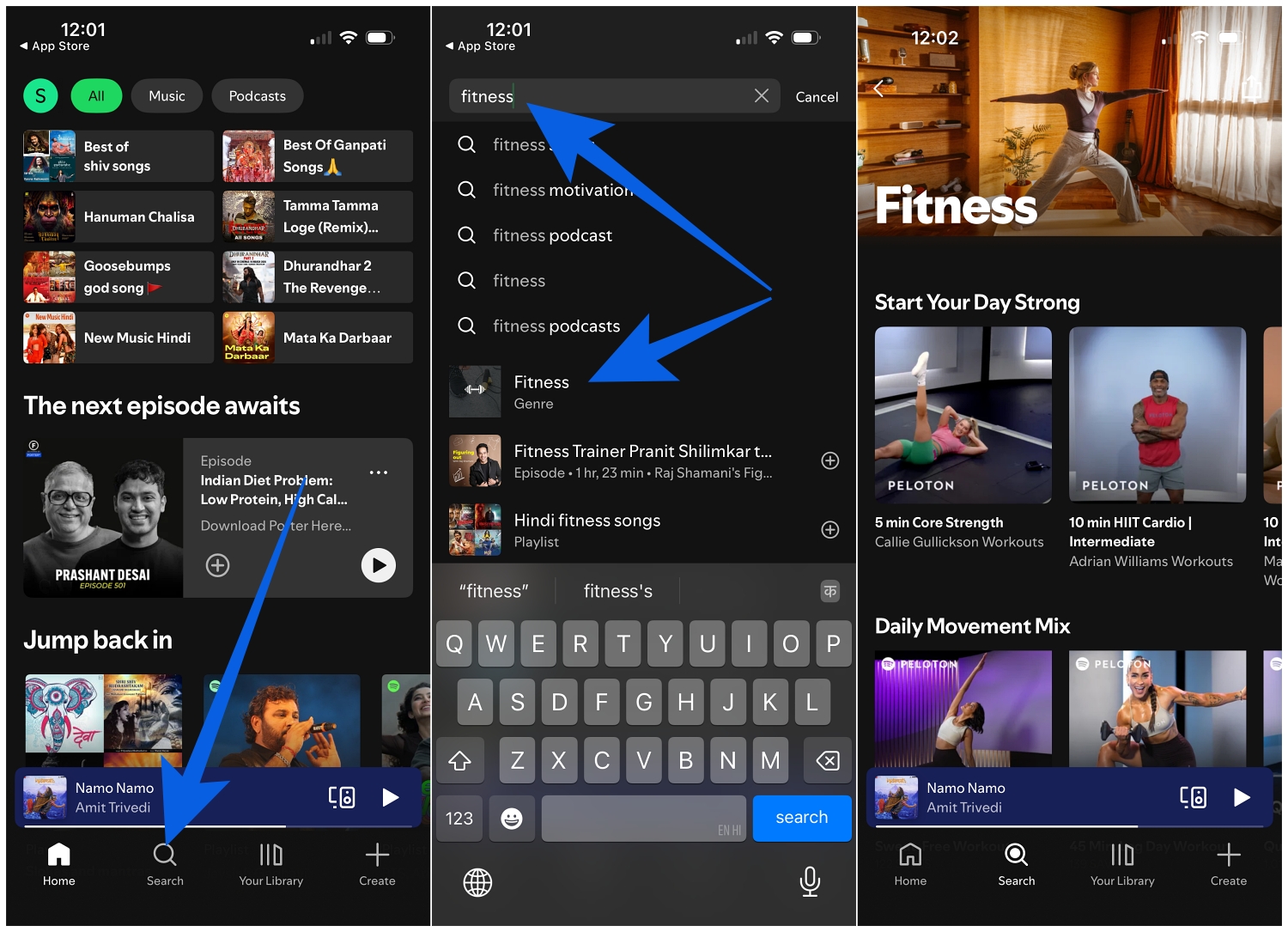
From there, everything feels intuitive.
You can jump between guided classes, playlists, and recovery sessions without switching apps. If you’re already familiar with Spotify’s interface, this feels like a natural extension rather than something new to learn.
If you’re still figuring out how Spotify organizes content, it’s worth understanding what the icons and symbols on Spotify mean, since small UI cues actually help you navigate faster.
One Seamless Experience Across Devices
This is the part that makes the biggest difference in daily use.
You can start a workout video on your TV, continue with audio on your phone during a run, and later switch to a guided meditation on a smart speaker.
There’s no reset. No restarting. No friction.
That continuity is something most fitness platforms struggle with, and Spotify handles it surprisingly well because it builds on an ecosystem people already use daily.
And if you’re someone who listens to music or podcasts before bed, pairing this with features like a sleep timer on Spotify for music and podcasts makes the experience feel more complete beyond just workouts.
What Makes This Different From Other Fitness Apps
Most fitness apps are built around commitment. Subscriptions, programs, schedules, and sometimes equipment. Spotify takes a different approach. It lowers the barrier.
You don’t need to commit to a system. You just start. That makes it easier to stay consistent, especially for people who struggle with routine or don’t want another subscription.
From what I’ve seen, that simplicity might be the biggest advantage here.
Final Thoughts
Spotify moving into fitness isn’t just about adding workouts. It’s about removing friction from something people already do.
Instead of managing multiple apps, you now have a single place where your workouts, music, and recovery sessions live together. It’s still early, but the direction is clear. Spotify is positioning itself as more than an audio platform. It’s becoming part of how you structure your day.
And if they continue building on this, this could easily become one of the most used features on the platform.
No. All Peloton classes available through Spotify are equipment-free and accessible directly within the app for Premium users.
Yes. Free users can access curated playlists and creator-led content, but the full Peloton class library is limited to Premium users.
Yes. You can download classes and access them offline, which is useful if you’re training without a stable internet connection.
Don’t miss these related reads: