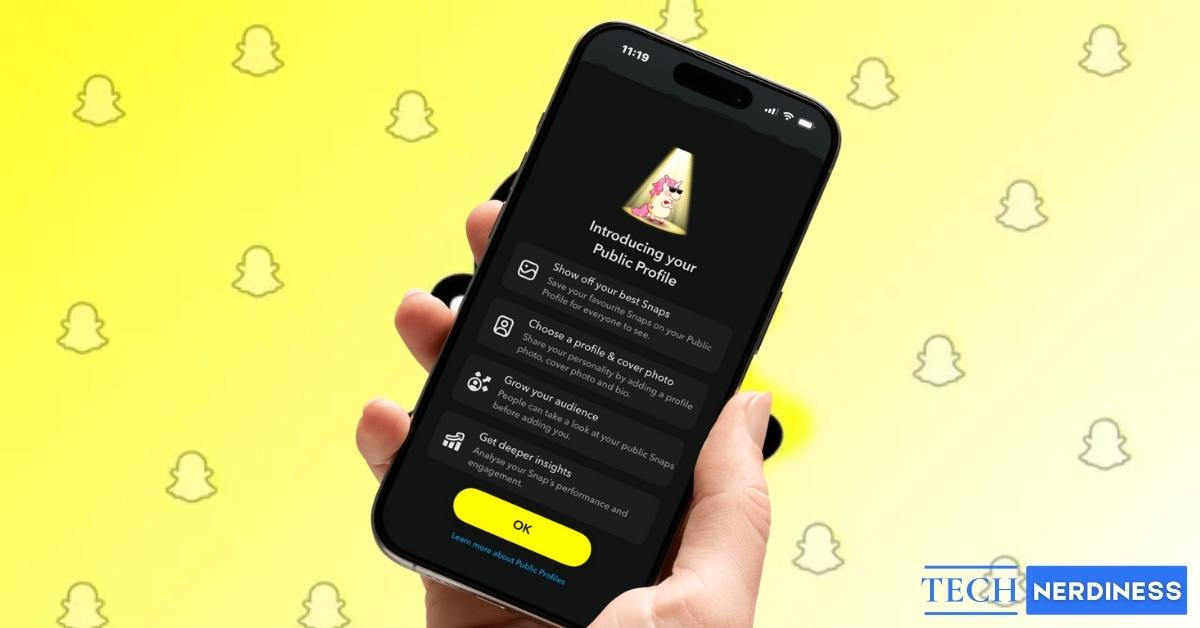
What started as just another instant messaging platform has quickly become one of the top marketing hubs for both brands and content creators. As a social media influencer, Snapchat lets you showcase your Snaps, Stories, and Spotlight content to a broader audience, not just your friends.
However, you cannot share your content with people other than your friends if you don’t have a public profile on Snapchat. This means setting up a public profile is the first step you must take if looking to grow your presence on Snapchat.
This post details what a public profile on Snapchat is and how to create, edit, and share it.
What is a Public Profile on Snapchat?
Unlike Instagram, where you can either maintain a private account or a public account, Snapchat’s Public Profile allows you to explore the creator’s life while still keeping your regular profile for friends under the same account. While your snaps and stories shared from your regular Snapchat profile are mostly limited to friends, a public profile lets you:
- Share content with the entire Snapchat community.
- Allow people to subscribe to your updates without needing to add you as a friend.
- Showcase your personality, creativity, or brand through bio, photos, and highlights.
- Gain access to analytics about your audience and content performance.
You can think of it as Snapchat’s version of a creator page or brand profile.
Who Can Make a Public Profile on Snapchat?
While having a Snapchat account is the basic requirement to create a public profile, not every user can create one.
You must fulfill the following criteria:
- You must be at least 18 years old.
- A verified phone number and email must be linked to your account.
- Your account should have a history of regular activity (sending snaps, adding friends, etc.).
- Your account must follow Snapchat’s Community Guidelines. Any violations may block you from accessing the feature.
How to Make a Snapchat Public Profile
Now that you know whether you’re eligible to create a public profile on Snapchat, here’s how you can create one:
- Open Snapchat and head to your profile.
- Here, tap Public Profile, and you’ll see an introductory screen.
- Next, tap the Okay button on the introductory screen.
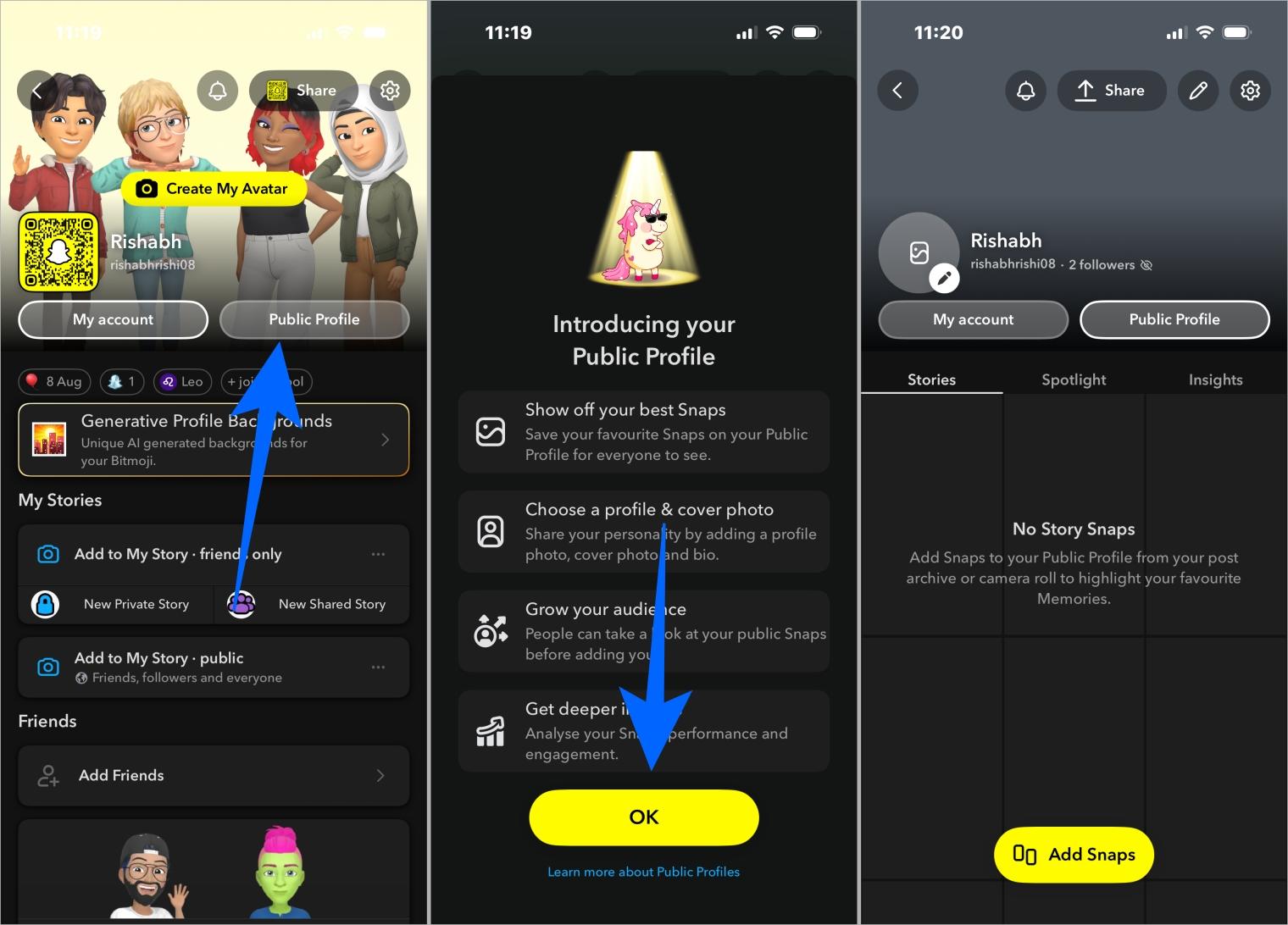
- Then, tap the Create button to confirm.
- Now, set up your public profile by entering:
- Profile Name: Choose a display name for your public profile.Profile
- Photo: Add a photo or avatar to make your profile recognizable.
- Bio: Write a short bio about yourself or your content.
And that’s it; your Snapchat public profile creation is now complete. This makes it easier to focus on creativity while recording.
How to Edit, Share and Delete Your Public Profile on Snapchat
Now that you’ve created your Snapchat public profile, you can post content to a wider audience. You can also edit your public profile at any time to add or remove personal information, share it with your followers on other platforms so they can follow you on Snapchat as well, or even delete it if you wish. If notifications get overwhelming as your subscriber base grows, you can turn off Story notifications on Snapchat to manage alerts better.
How to Edit Your Public Profile on Snapchat
Whether your public profile is a day old or one year old, Snapchat allows you to edit it according to your preference at any time.
Here’s how:
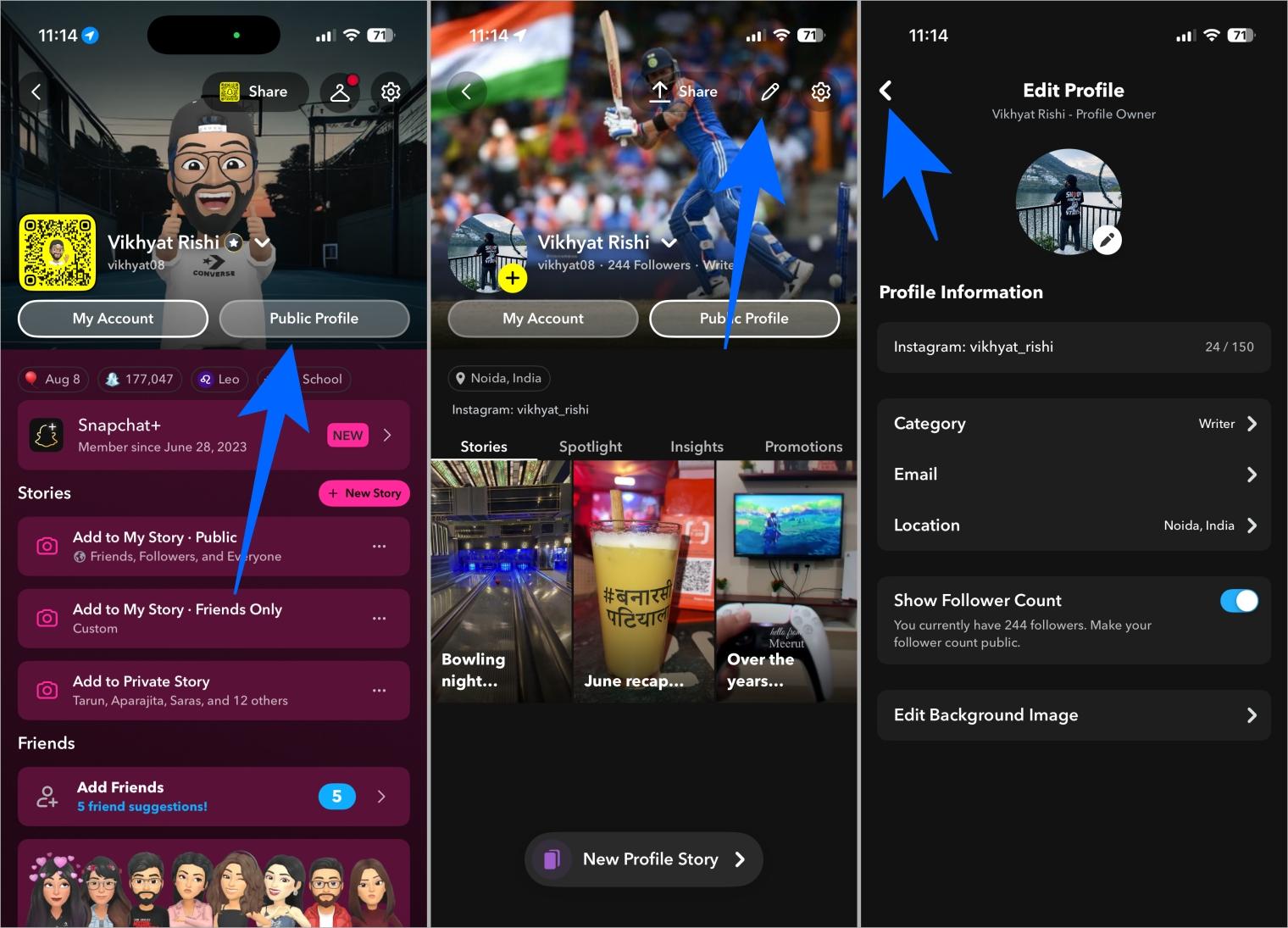
- Open Snapchat and head to your profile.
- Here, tap the Public Profile button.
- Next, tap the pencil icon at the top to enter editing mode.
- Now, make the desired changes. You can add a new profile picture, remove the existing one, update or remove your location, add or remove a bio, choose to display your follower count, and more.
- Once done, simply tap the Back button at the top left corner to save your changes.
You may like to read: How to Pause Your Snapchat Location ( Without Turning It Off )
How to Share Your Snapchat Public Profile
Once you’ve updated your Snapchat public profile with the latest information, you can share its link on other social media platforms to grow your audience.
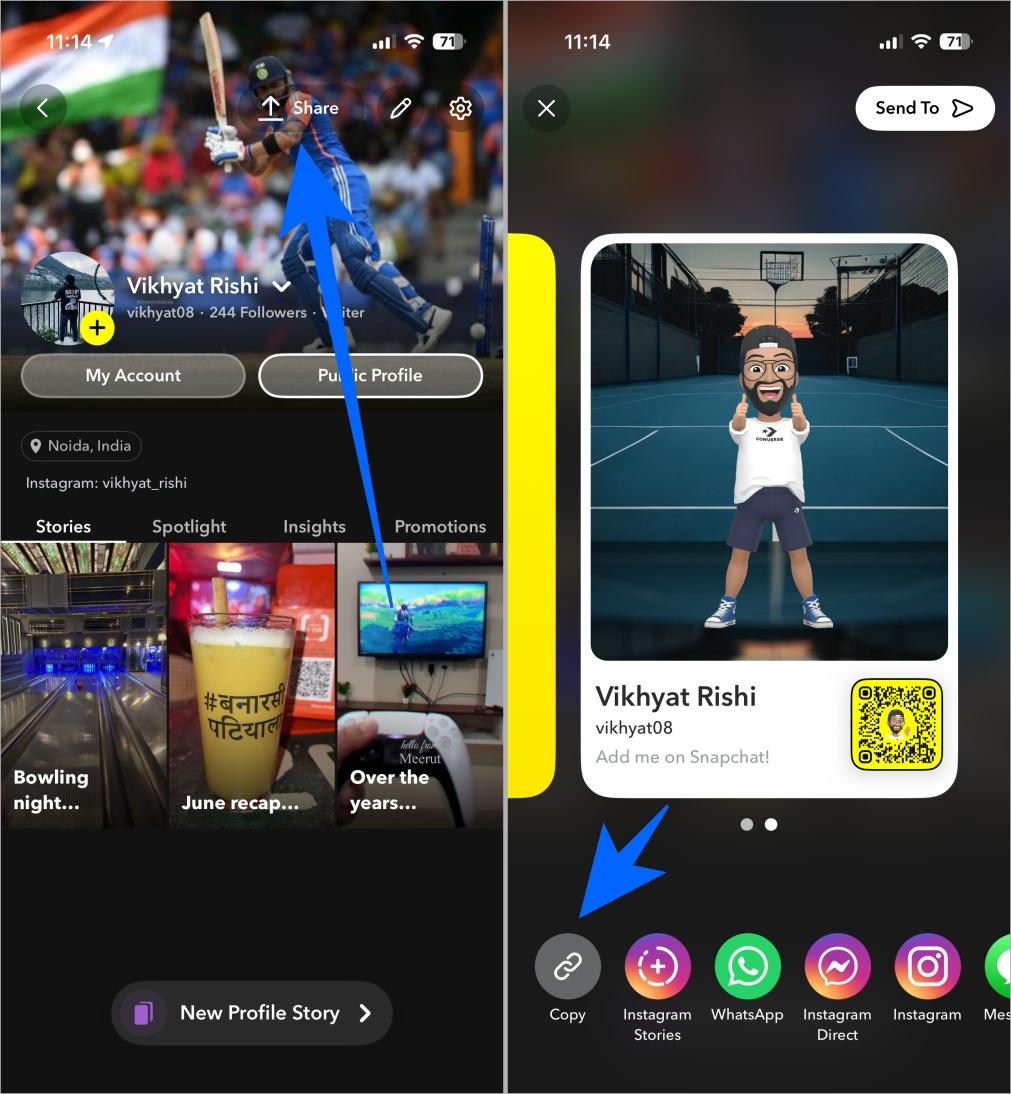
- Open Snapchat and head to your Public Profile.
- Here, tap the Share button at the top.
- Now, either tap the Copy Link button, then share it on other platforms or choose one of the available sharing options.
How to Delete Your Public Profile on Snapchat
While Snapchat has kept public profile editing relatively straightforward, it does not allow you to delete it entirely. It only allows you to clear it. Clearing your public profile is nearly identical to deleting it, as your bio, profile photo, public stories, and other content are removed.
However, any content shared on Snap Map or Spotlight remains visible but without your name attached until you reactivate your public profile.
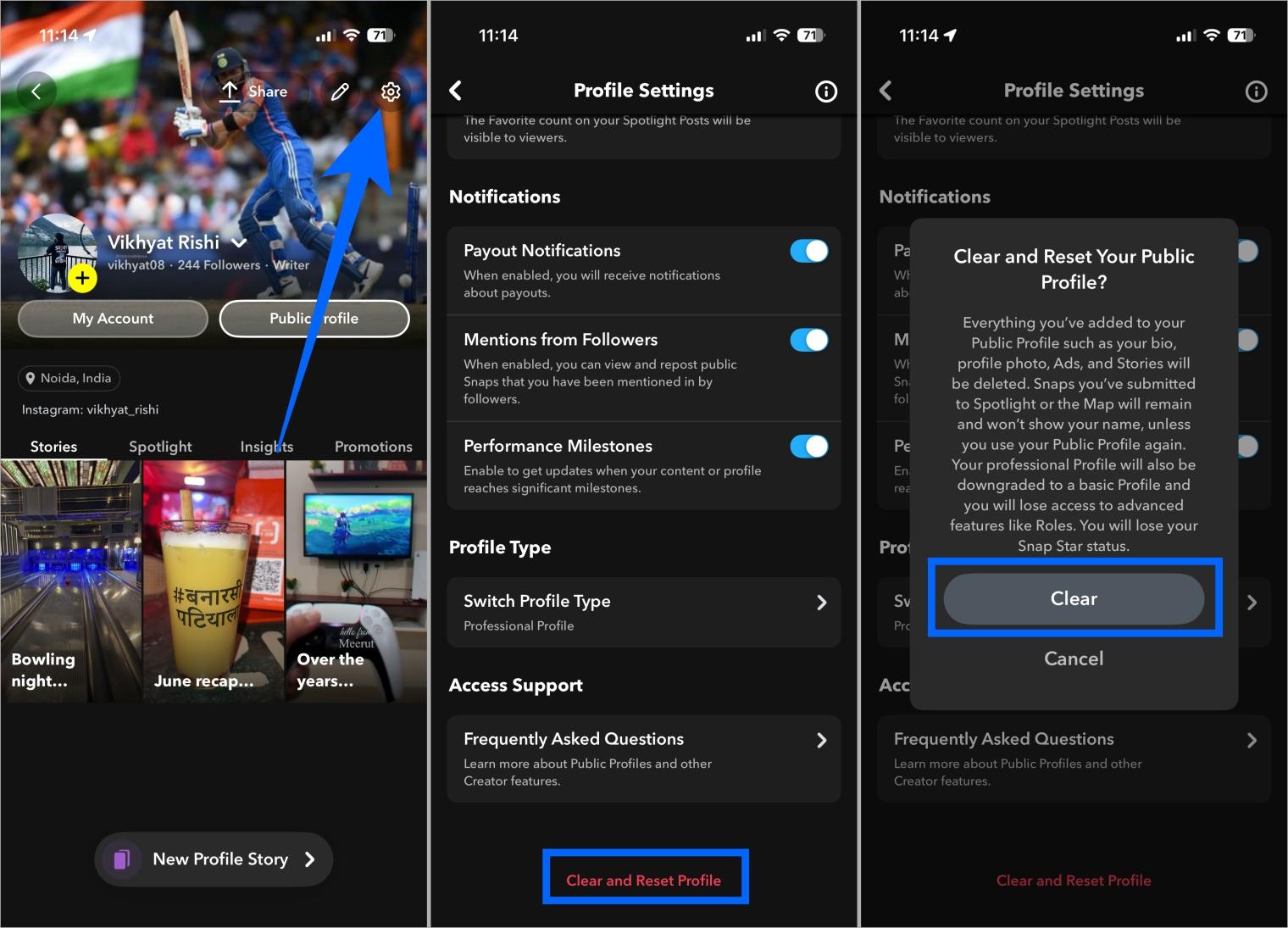
Here’s how you can clear your Snapchat public profile:
- Open Snapchat and head to your Public Profile.
- Here, tap the Settings cog at the top.
- Next, scroll down to the bottom and tap Clear and Reset Profile.
- Tap the Clear button to confirm.
Benefits of Having a Public Profile on Snapchat
Having a public profile on Snapchat unlocks features that help you grow your presence, connect with a broader audience, and showcase your best content.
- Reach a wider audience: Anyone on Snapchat can find and follow you.
- Get subscribers instead of friends: People can subscribe to your content without being added as a friend.
- Access analytics: Learn what content works best with real-time insights.
- Boost personal or business branding: Ideal for creators, influencers, and businesses seeking to increase visibility.
- Highlight best content: Pin your top Snaps to keep them at the top for new visitors.
Start Growing with Your Public Profile Today
Having a public profile on Snapchat opens the door to a world of opportunities, whether you’re looking to grow a personal brand, become a creator, or showcase your business. Remember, having a public profile alone will be of no benefit unless you consistently and creatively update your content. So, stay consistent with your efforts, and the higher engagement rate will follow naturally.