Roblox runs on discovery, and the like system sits right at the center of it. When you like a game on Roblox, you are doing more than tapping a button. You are helping the experience perform better in recommendations, giving the creator useful feedback, and signaling to other players that the game is worth trying.
But there is another reason players look for the like button: rewards. Many Roblox experiences ask players to like the game before releasing codes, badges, boosts, or in-game items. It is a simple way for developers to encourage support, and for players, it can be an easy bonus if you already enjoy the game.
The basic like system has not changed much. Whether you are using Roblox on PC, mobile, Xbox, or PlayStation, the thumbs-up button still works the same way. The only real difference is where you find it and how you select it on each device.
Here is how to like a Roblox game on PC, mobile, and console.
How to Like a Roblox Game on PC
Liking a game on PC is the easiest method because the game page gives you direct access to the rating buttons. Whether you use the Roblox website or the desktop app, the process is almost the same.
Via the Roblox Website
- Open the Roblox website in your browser and log in.
- Search for the game you want to like or open it from your home page.
- Open the game’s main page without launching it.
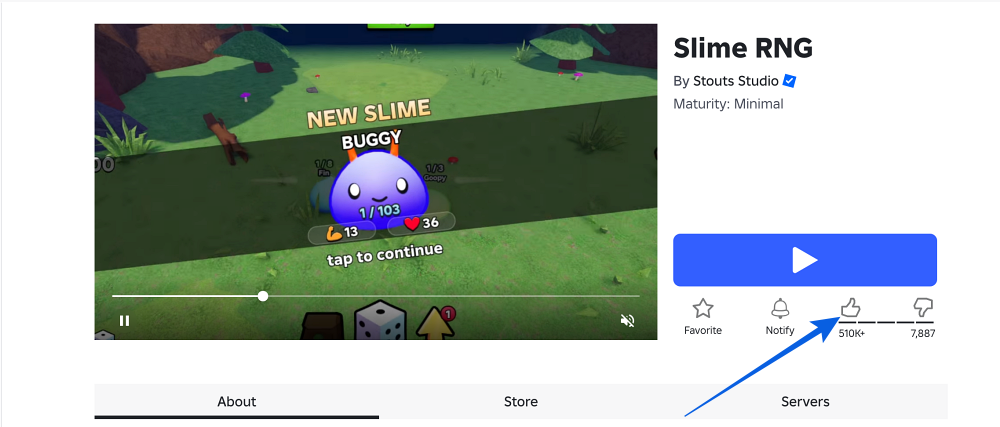
- Look for the thumbs-up icon below the Play button.
- Click the thumbs-up icon.
- Wait for the icon to fill in or change color. That confirms your like has been registered.
Via the Roblox Desktop App
- Open the Roblox app on your PC.
- Search for the game or select it from your home page.
- Open the game’s main page.
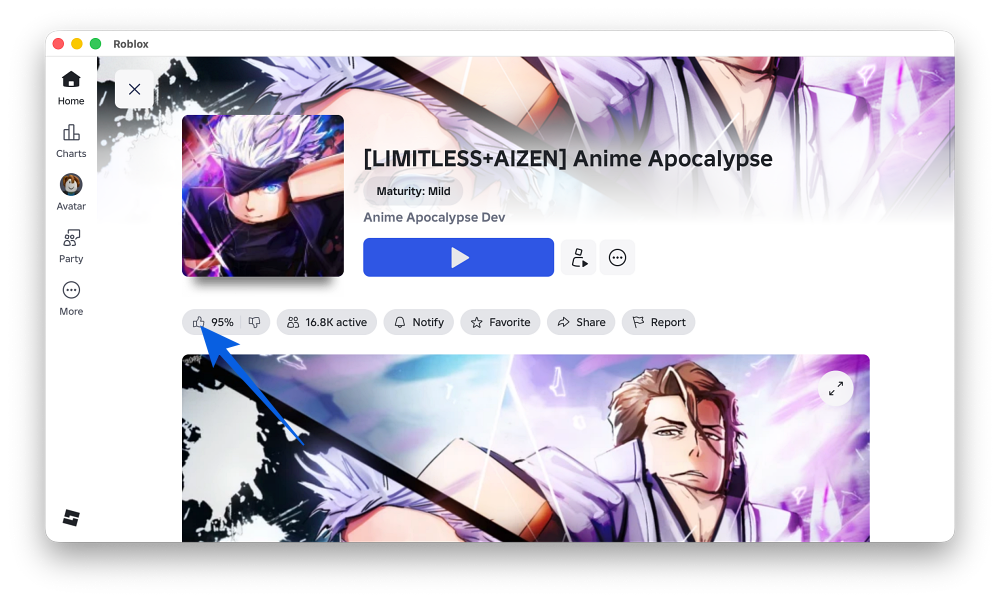
- Scroll slightly if needed to find the rating section.
- Click the thumbs-up button.
- Make sure the icon changes state to confirm your like.
In my testing, the easiest mistake is launching the game first and then wondering where the like button went. Roblox places the rating buttons on the experience page, so you need to like the game before pressing Play or return to the game page after playing.
If you ever run into suspicious links, fake reward pages, or account prompts while browsing Roblox games, it is worth reviewing how to avoid getting hacked on Roblox. A few safe habits can protect your account from common scams.
How to Like a Roblox Game on iOS and Android
On mobile, you need the Roblox app installed before you can like games. The process is quick, but the button can be easy to miss if you are used to tapping Play immediately.
On Android
- Open the Roblox app on your Android phone or tablet.
- Search for the game or open it from your recommended feed.
- Tap the game to open its main page.
- Do not tap Play yet.
- Tap the thumbs-up icon below the game title or rating area.
- Wait for the icon to fill in or change color.
On iPhone or iPad
- Open the Roblox app on your iPhone or iPad.
- Search for the game or select it from your home screen.
- Open the game’s main page.
- Tap the thumbs-up icon under the game title or near the rating section.
- Wait for the icon to fill in. That confirms your like.
One thing worth knowing: Roblox may require you to launch or play an experience before you can rate it. If the like button is unavailable, open the game once, leave, return to the game page, and try again.
How to Like a Roblox Game on Console
Console players can also like Roblox games, but navigation feels a little slower because you are moving a cursor with a controller. The button is still the same thumbs-up icon, you just need to select it carefully.
On Xbox
- Launch Roblox on your Xbox and sign in.
- Find the game you want to like.
- Open the game’s main page.
- Use the left stick to move the cursor to the thumbs-up icon.
- Press A to like the game.
- Look for the visual change that confirms your like.
On PlayStation
- Open Roblox on your PS4 or PS5.
- Search for the game or open it from your recently played list.
- Go to the game’s main page.
- Use the analog stick or touchpad to move the cursor to the Like button.
- Press X to select it.
- Wait for the icon to change state.
Console navigation is not as fast as PC or mobile, but once you know where to look, liking a game takes only a few seconds.
Why Liking a Game on Roblox Matters
It is easy to treat the like button as an afterthought, but it does matter.
Likes help Roblox understand which experiences players enjoy. Games with stronger engagement and better like-to-dislike ratios are more likely to perform well in search, recommendations, and discovery sections. That can make a real difference for smaller creators trying to get noticed.
Likes also help other players. When someone lands on a game page, the rating gives them a quick signal about whether the experience is worth trying.
Developers also use likes as community milestones. For example, a game may release a new code when it reaches a certain number of likes, or offer badges, boosts, or in-game rewards after hitting a target. If you regularly play Roblox experiences that use reward codes, you may also want to check updated code lists like Roblox Music codes or other game-specific code guides.
So, if you enjoy a Roblox game, liking it is one of the easiest ways to support the creator and help the game reach more players.
Final Thoughts
Liking a game on Roblox takes less than ten seconds, but it can still make a difference. It supports creators, improves discovery, helps other players judge an experience, and may even help unlock community rewards in some games.
On PC and mobile, the like button is easy to find on the game page. On console, it takes a little more cursor navigation, but the process is still simple once you know where to look.
Whether you are supporting a creator, helping a hidden gem get noticed, or claiming a like-based reward, the thumbs-up button is worth using when a game earns it.
Check out more Roblox codes: