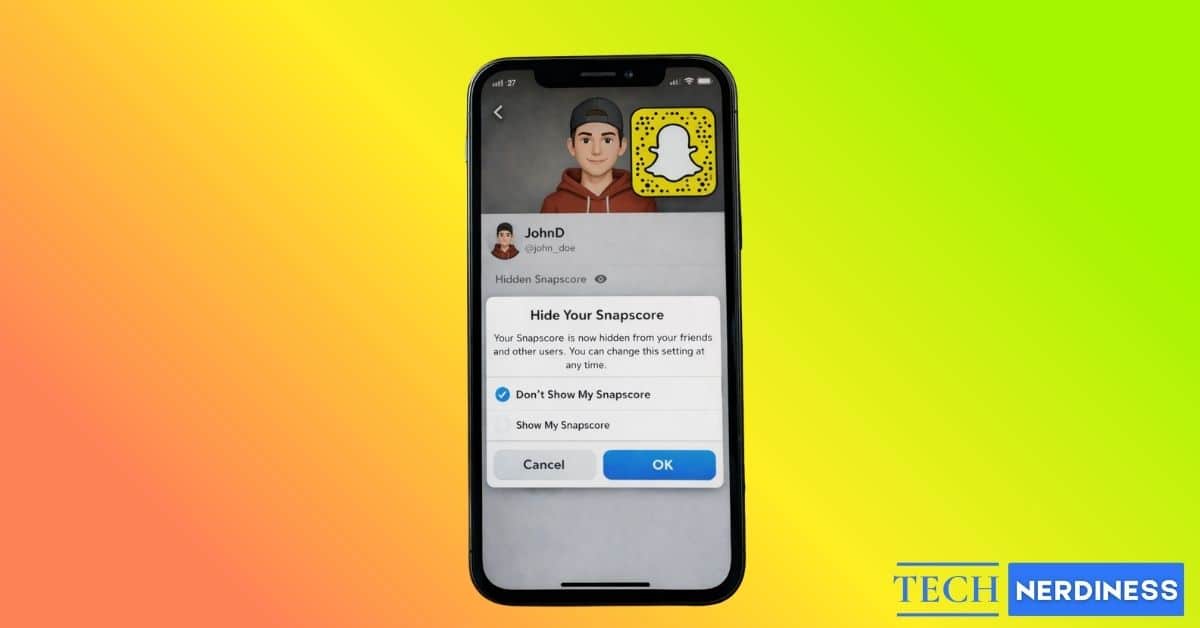
Your Snapscore is the biggest indicator of how active you are on Snapchat, so it doesn’t matter if you personally care about it or not. It tends to draw attention anyway. Friends often tap on your profile out of curiosity, either to compare scores or simply to get a sense of how often you use the app. Over time, that small number can start to feel more revealing than intended, especially if you prefer to keep your activity private from someone you’d rather keep at bay.
While Snapchat does not offer a direct option to hide your Snapscore, that does not mean you are out of control. This post details how Snapchat Snapscore works, what you can and cannot do, and how to limit who can see your Snapscore on iOS and Android phone.
What Is Snapscore on Snapchat and How It Works?
Your Snapscore is the numerical value that appears beneath your name on your Snapchat profile that represents how active you are on the platform. It updates automatically when a sent Snap is viewed in an individual or group conversation, when you view snaps sent to you, and when you add a snap to your Stories.
Only people you have added as friends can see your Snapscore. Non-friends cannot view it. If you remove or block someone, they immediately lose access to your score.
While the Snapscore doesn’t hold any functional value, many users treat it as a social signal. Friends may compare scores, associate higher numbers with heavier usage, or interpret changes as a sign of increased activity. This is why Snapscore often feels more revealing than it actually is.
Can You Hide Your Snapscore on Snapchat?
Simply put, no, you cannot hide your Snapscore. There is no global privacy toggle, no custom audience selector, and no option to hide it from everyone at once. Anyone on your friend list can access your profile and compare your older Snapscore with the current number to see how active you have been on Snapchat recently.
However, as more users look for ways to hide their Snapscore, Snapchat may eventually introduce a dedicated privacy control. If the platform’s recent approach is any indication, such a feature would likely arrive as part of Snapchat Plus features rather than being available to all users by default.
How to Hide Your Snapscore from Specific People
While there’s no way you can make your Snapscore invisible on your profile, there are a few extreme steps you can take to permanently hide from someone who is using your Snapscore to monitor your activity, make comparisons, or harass you about how often you use the app.
Remove a Friend From Snapchat
Removing a friend is the simplest way to hide your Snapscore from them. Here’s how you can do it:
- Head to your Snapchat profile.
- Tap My Friends under Friends.
- Press and hold the friend’s name you want to remove.
- Tap Manage Friendship.
- Tap Remove Friend and confirm.
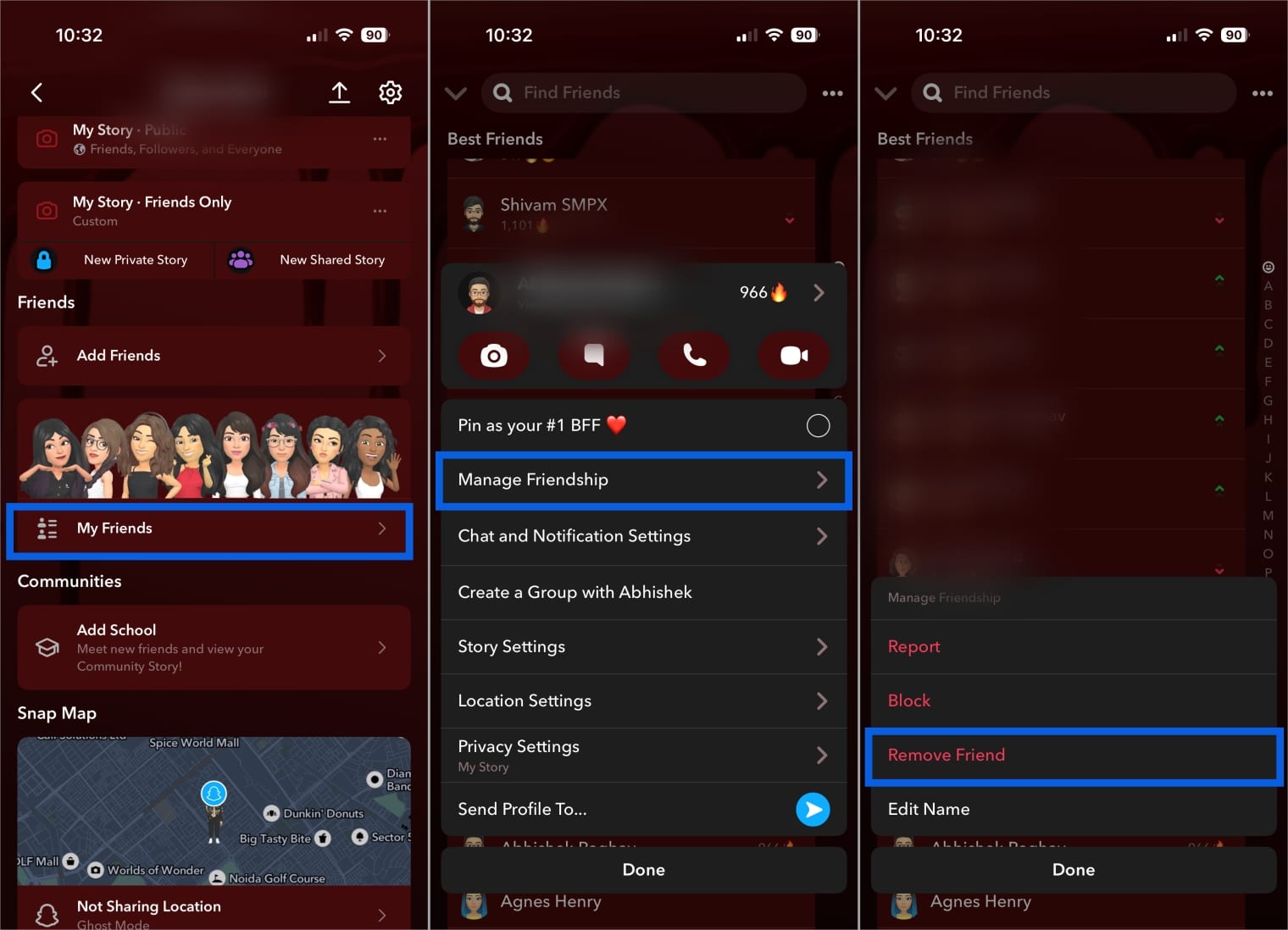
Once removed, they are no longer treated as a friend, and your score disappears from their view. Additionally, they won’t be able to send you snaps or messages or view your friends-only Stories. Any information on your Public Profile remains visible.
Block a User Completely
While simply removing someone as your friend would do the job, they can still contact you through public stories and Spotlight, asking why you removed them or for you to add them back. In such cases, blocking them becomes necessary as it’s the strongest privacy action on Snapchat.
- Open the user profile you want to block.
- Tap the three-dot button at the top right corner.
- Tap Block and confirm.
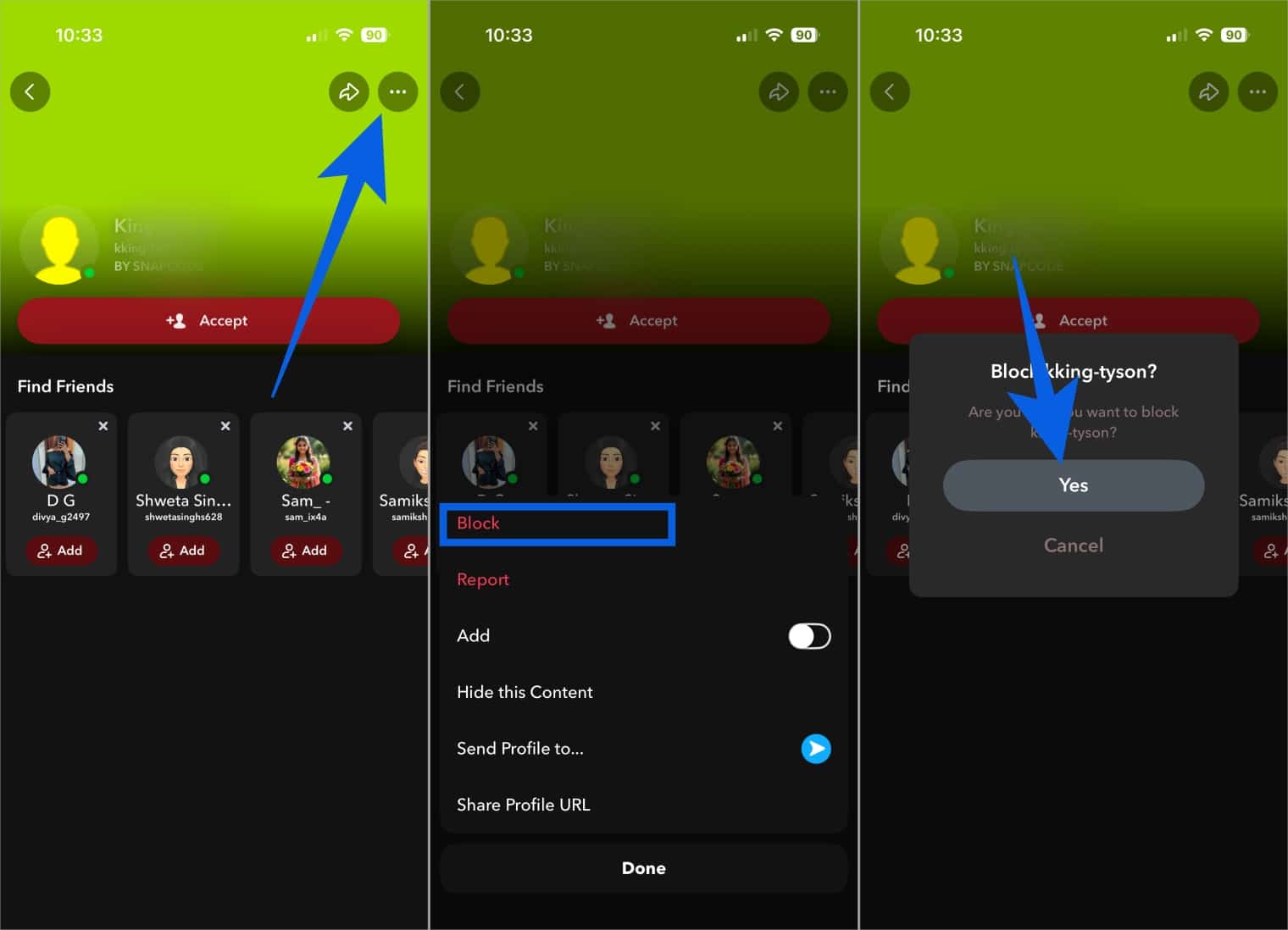
Once done, the user will immediately lose all access to your general and Public Profile, public Stories, Spotlight, chat history, and Snapscore. However, if you ever find yourself at the receiving end of blocking, there are signs you’ve been blocked on Snapchat that you can recognize.
Limit Who Can Contact You
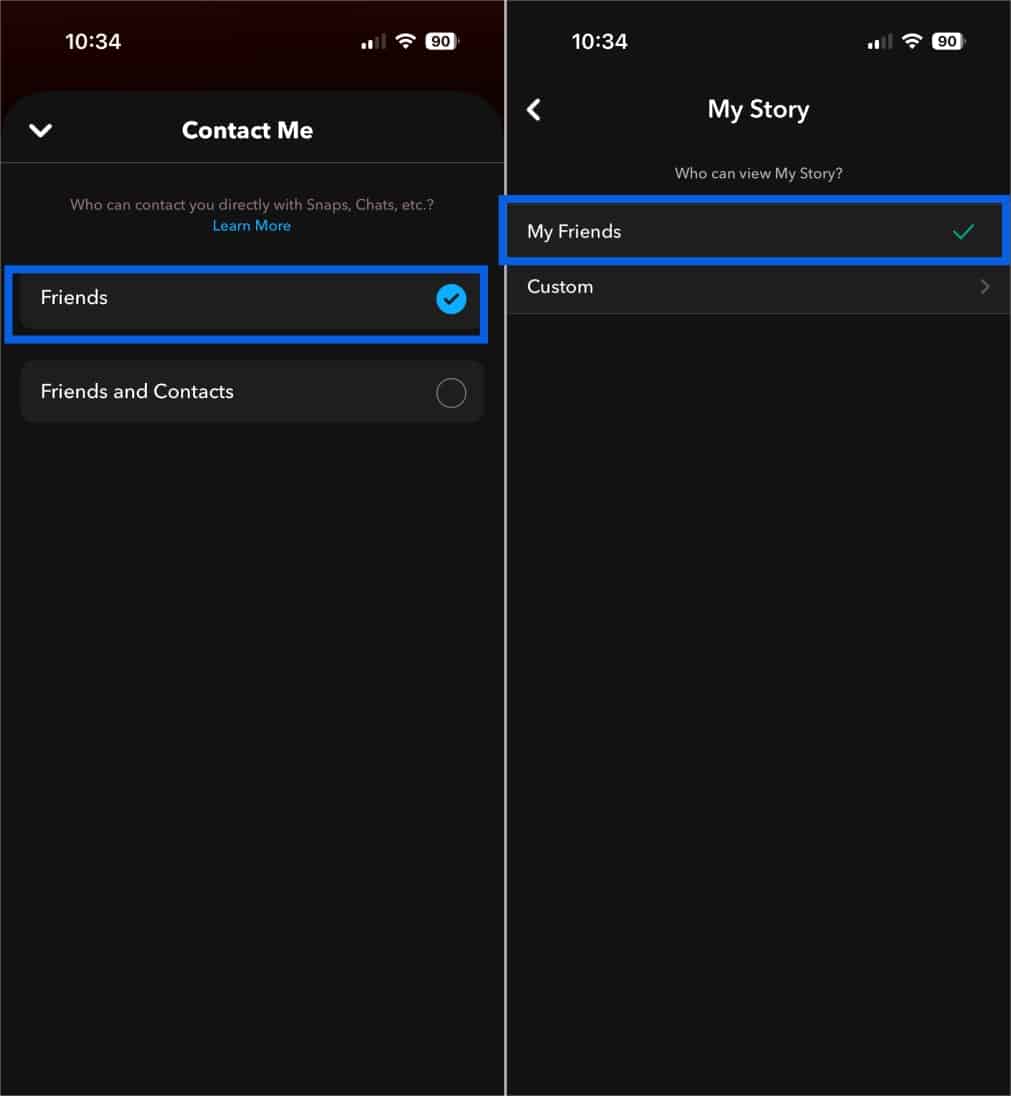
If blocking seems extreme, you can update your “Contact Me” and “View My Story” settings to limit who can contact you after you remove them. This does not hide your Snapscore on its own, but it prevents new people from entering the visibility circle.
- Open Snapchat and head to your profile.
- Tap the Settings icon at the top right corner.
- Tap Contact Me under Privacy Controls.
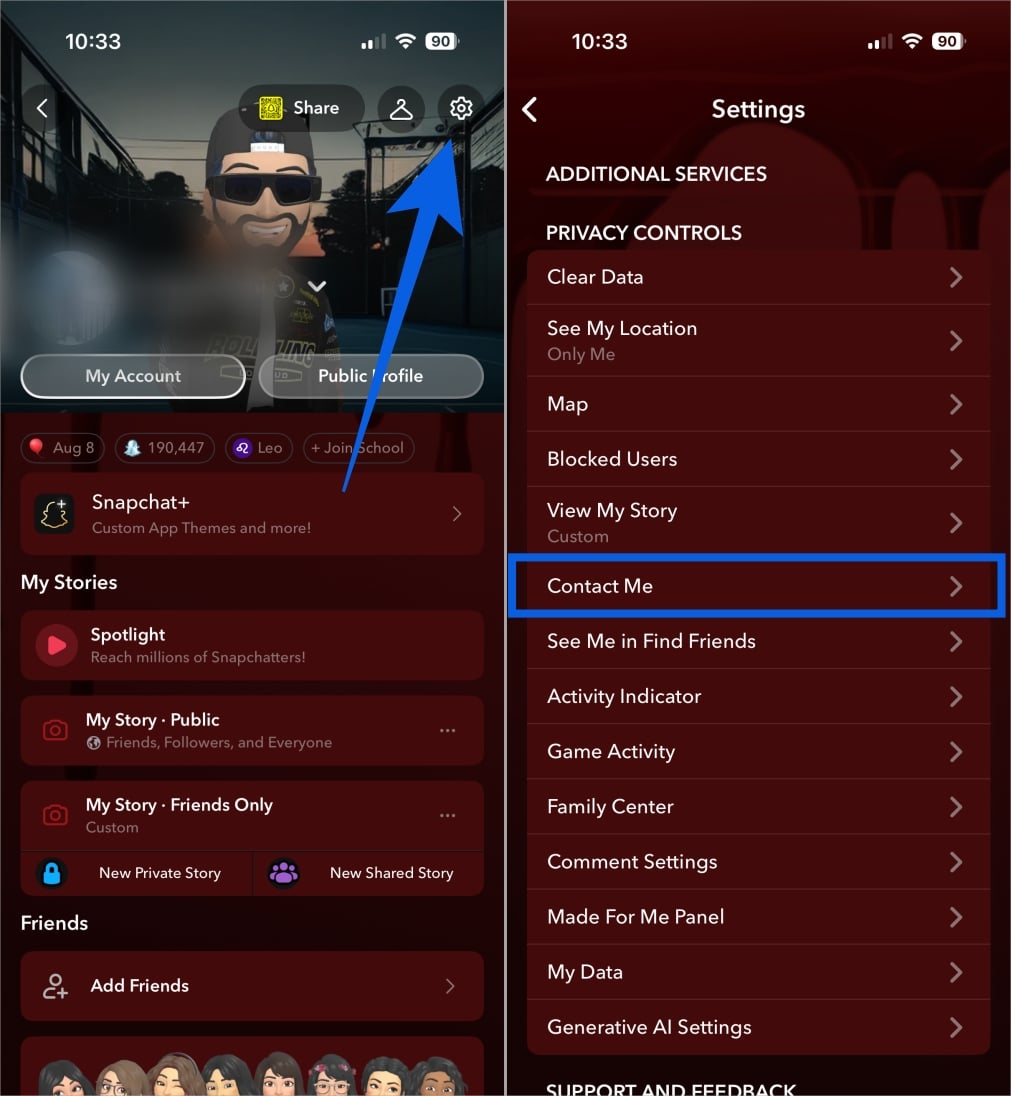
- Select Friends.
- Now, head back and tap View My Story.
- Select My Friends.
Does Removing or Blocking Someone Reset Your Snapscore?
Your Snapscore is tied to your account activity, not to individual friendships, so no, removing or blocking someone on Snapchat does not reset, reduce, or otherwise affect your Snapscore.
When you remove or block someone, they simply lose access to viewing your Snapscore. The number itself remains unchanged on your profile and continues to update normally in the background.
Why Do People Want to Hide Their Snapscore?
Snapscore was originally meant to be a fun activity metric. However, over time, it has taken on a different meaning for many users. Here are some well-known reasons most users now want to hide their Snapscore:
- It reveals how active you are on Snapchat, which some users consider private.
- Friends often compare Snapscores, creating unnecessary social pressure.
- Sudden score changes can invite questions or assumptions about who you are snapping with.
- In some cases, people track Snapscore changes to monitor or harass others.
- Users who prefer a low profile want to avoid visible engagement metrics.
- It helps maintain personal boundaries and reduces unwanted attention.
Troubleshooting: Snapscore Still Visible?
| Issue | What to Check or Do |
|---|---|
| User is still a friend | Open My Friends and confirm the person is removed. |
| Wrong person removed | Double check the exact username and profile. |
| Changes not synced yet | Restart the app and wait a few minutes. |
| Accidentally re-added the user | Remove or block the user again. |
Taking Control of Your Snapscore…
And that’s it; now you know you cannot hide your Snapscore outright. What you can do is control who qualifies as a friend, reduce how easily people discover your profile, and remove public exposure points. If your goal is just to hide your Snapscore from a user, removing them from your friend list will do the job.
Have thoughts on Snapscore privacy or a tip that worked for you? Share your experience in the comments and join the conversation.
FAQs About Snapscore
No. Snapchat does not notify users when you remove or block them.
Snapscore itself follows friend-based visibility rules. Only users who are added as friends can see it.
No. Snapchat does not offer a temporary hide option. Once you remove or block someone, the Snapscore stays hidden from them until you re-add that user.