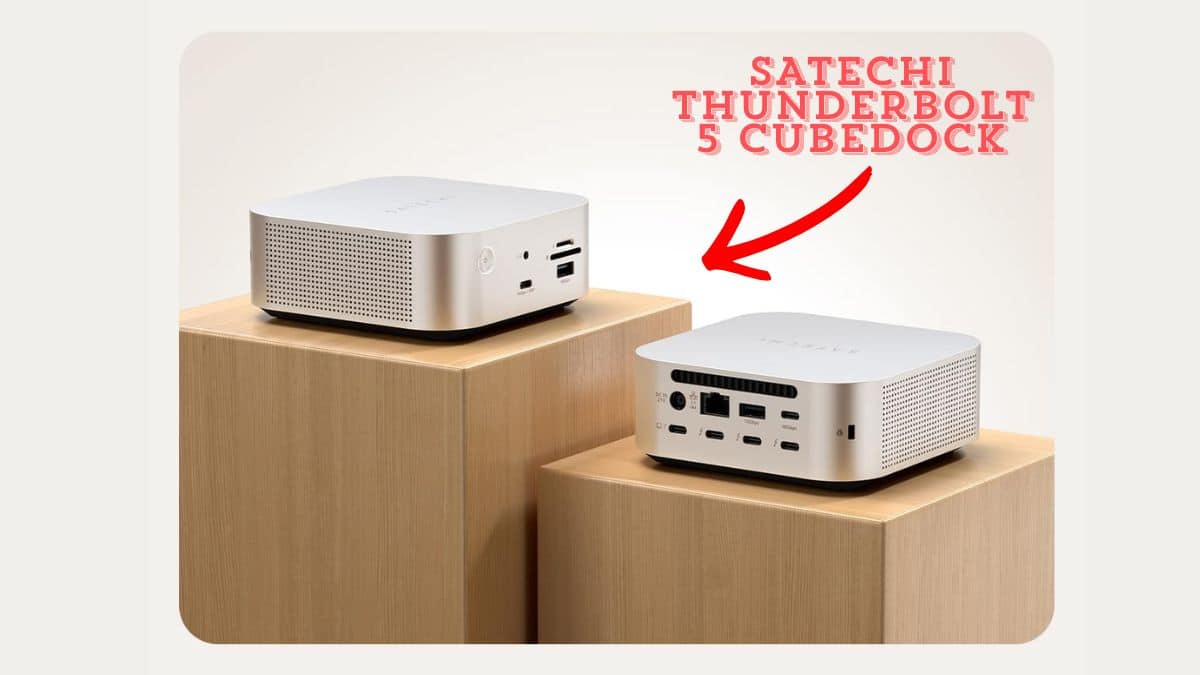
The Satechi Thunderbolt 5 CubeDock solves a familiar problem. If you’ve ever tried to run a multi-monitor Mac setup off a single cable, you know the drill: buy a dock, hope it doesn’t turn your desk into a rat’s nest of adapters, and pray it doesn’t die under a heavy transfer. I’ve been testing the CubeDock for a few weeks now. It’s the rare dock that actually looks and feels like it belongs next to your Mac rather than bolted onto it.
In this review, I’ll break down how the Satechi Thunderbolt 5 CubeDock performs, what features stand out, and whether it’s worth the $399.99 asking price for your desk.
Satechi Thunderbolt 5 CubeDock at a Glance
| Pros | Cons |
|---|---|
| ✅ Four Thunderbolt 5 ports (one upstream, three downstream) | ❌ SSD not included; budget for your own drive |
| ✅ Built-in NVMe SSD enclosure, up to 8TB at 6,000MB/s | ❌ Audible fan with a faint electronic whine in quiet rooms |
| ✅ 140W host charging fast-charges a 16-inch MacBook Pro | ❌ No dedicated HDMI or DisplayPort output |
| ✅ Mac mini-matching aluminum design | ❌ External 180W power brick adds desk clutter |
| ✅ Front-facing USB-C, USB-A, UHS-II card readers, Audio jack | |
| ✅ 2.5Gb Ethernet for fast wired networking |
What Is the Satechi CubeDock?
The CubeDock is a Thunderbolt 5 docking station that doubles as an M.2 NVMe SSD enclosure. Satechi unveiled it at CES 2026 as its first Thunderbolt 5 dock, and it started shipping earlier this year. The 5 x 5 x 2-inch aluminum shell is a near-identical match for Apple’s M4 Mac mini, right down to the silver finish. It genuinely looks like part of an Apple lineup rather than a third-party accessory.
Speed and Performance: Genuinely Fast, With a Catch
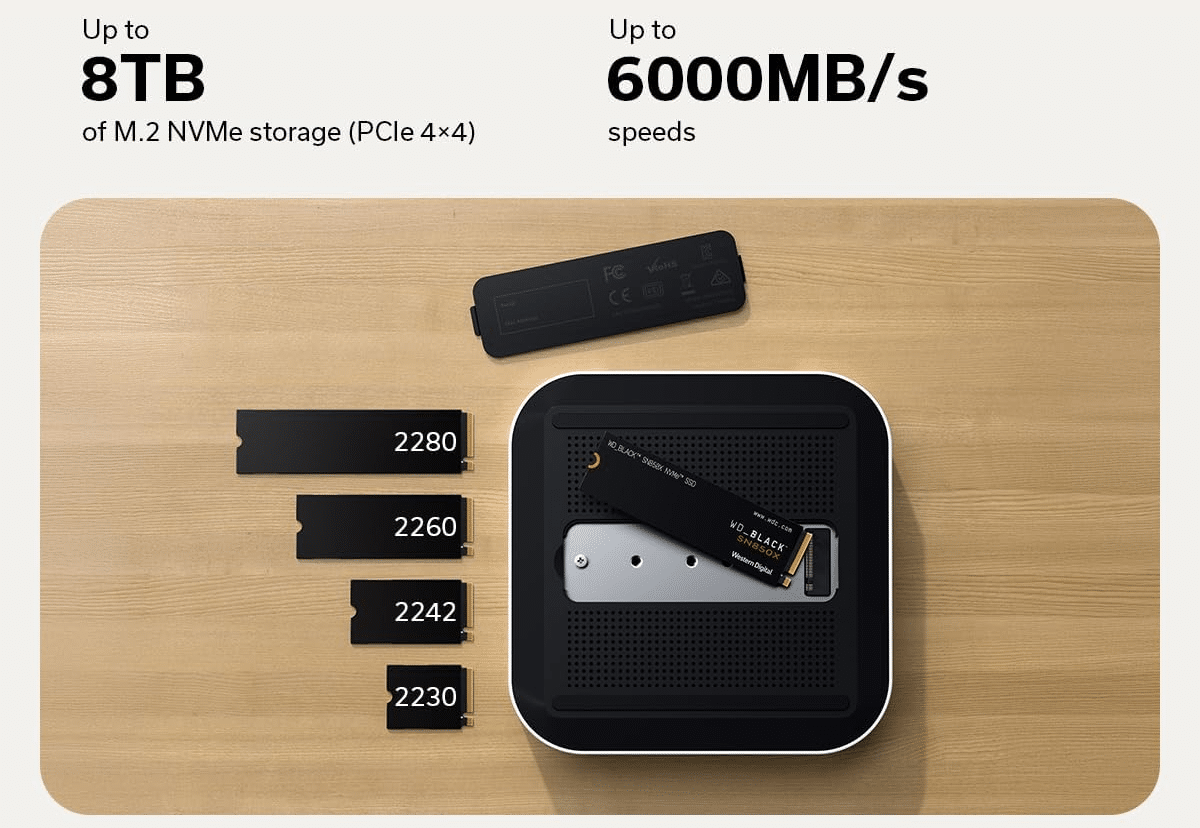
The CubeDock runs on a single Thunderbolt 5 upstream connection rated at 80Gbps bi-directional, with a 120Gbps Bandwidth Boost mode for display-heavy setups. Three additional 80Gbps Thunderbolt 5 ports sit downstream. In real use, that’s more bandwidth than nearly anyone needs day to day. It matters, though, if you’re pushing multiple high-refresh displays or transferring large files off the built-in SSD enclosure, which supports PCIe 4×4 drives up to 8TB at speeds up to 6,000MB/s.
The catch, and it’s a real one: the SSD is not included. You’re buying an enclosure, not storage. Factor in the cost of an M.2 NVMe drive (2230, 2242, 2260, and 2280 sizes are supported) before you budget for this dock.
Satechi Thunderbolt 5 CubeDock Key Features That Stand Out
1. Built-In SSD Enclosure
Pop off the bottom panel, and there’s a slot for your own NVMe drive, up to 8TB. Satechi includes the screwdriver, mounting screws, and thermal pads in the box. It means one less external drive cluttering your desk, and the drive shows up in macOS just like any other connected SSD.
2. Four Thunderbolt 5 Ports
One upstream host connection plus three downstream ports, each offering 80Gbps of bandwidth. That’s enough headroom for daisy-chaining other Thunderbolt peripherals without a noticeable slowdown.
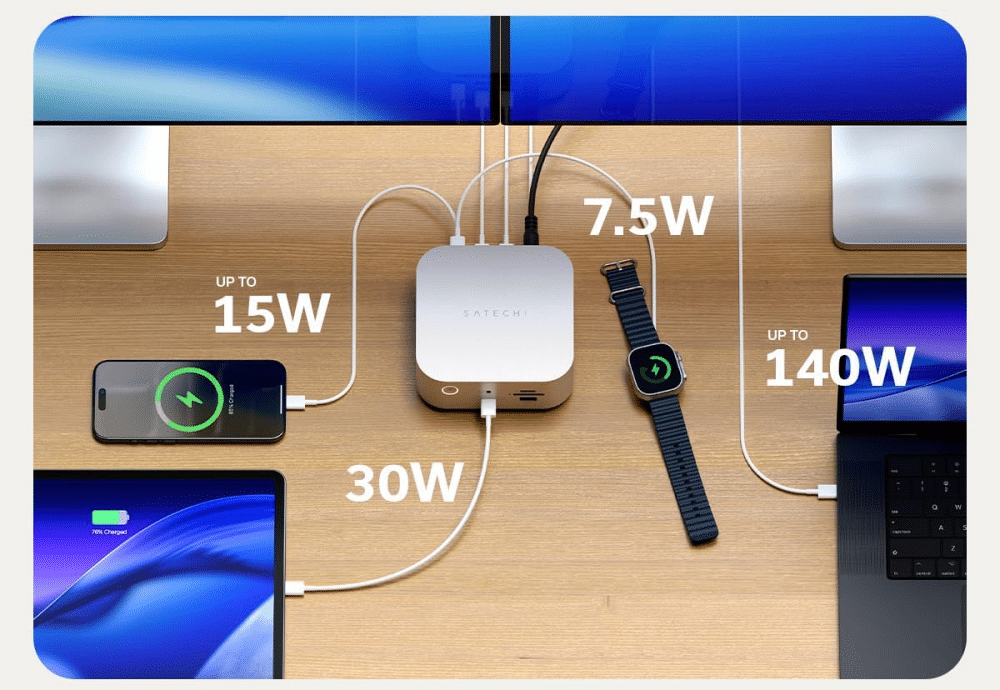
3. 140W Host Charging
The included 180W power supply can push up to 140W to a connected MacBook. That’s enough to fast-charge even a 16-inch MacBook Pro while it’s docked, with 30W of USB Power Delivery reserved for accessories.
4. Front-Facing, Easy-Access Ports
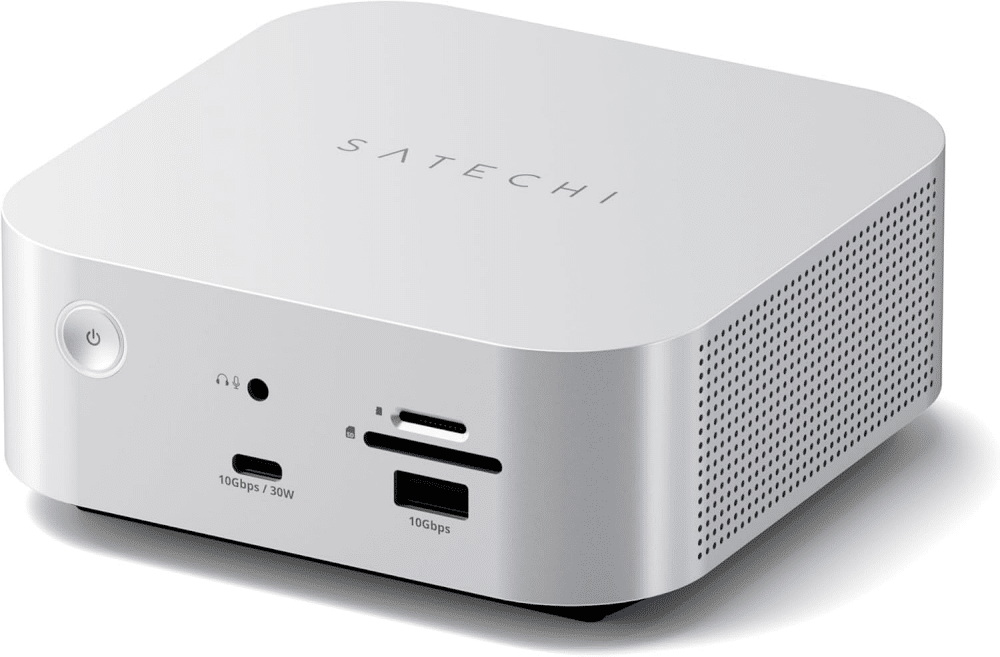
A 30W/10Gbps USB-C port, a 10Gbps USB-A port, SD and microSD UHS-II card readers, and a 3.5mm audio jack all sit on the front. Anyone who’s fumbled behind a monitor to find a card slot will appreciate this layout.
5. 2.5Gb Ethernet and Extra Rear Ports
Around back, alongside the Thunderbolt ports, you get a 2.5Gb Ethernet port plus an additional 10Gbps USB-C and USB-A pair. Wired networking at 2.5GbE beats most home Wi-Fi, though heavy NAS users on 10GbE networks will need an adapter or a different dock.
6. Active Cooling
An internal fan and vented aluminum chassis keep the SSD and controllers cool under sustained load, which protects transfer speeds during long renders and backups. It’s a smart tradeoff for sustained performance, though it comes with a downside covered below.
Platforms & Compatibility
The CubeDock works across recent Macs (M1 through M5-generation MacBooks, iMacs, Mac minis, Mac Studios, and Mac Pro) as well as Windows laptops with Thunderbolt 5, Thunderbolt 4, Thunderbolt 3, or USB4 ports. How many external displays you can drive depends heavily on your specific chip. Base M1 and M2 Macs support only one external display, while base M4 and M5 models can drive two. M5 Pro and M5 Max models can drive up to three at 6K/60Hz. Windows machines can push triple 8K displays at 60Hz. Check Satechi’s compatibility chart for your exact machine before buying.
Pricing
The Thunderbolt 5 CubeDock with SSD Enclosure retails for $399.99 directly from Satechi and Amazon (pricing checked July 2026). The box includes the dock, a Thunderbolt 5 cable, the 180W power supply, thermal pads, SSD mounting screws, and a screwdriver. That’s a premium price for a dock, but it’s in line with other Thunderbolt 5 options. The built-in SSD enclosure is what helps justify it: adding a separate Thunderbolt 5 SSD enclosure to a $300 dock would cost you more overall.
CubeDock vs CalDigit TS5 vs Sonnet Echo 21
| Details | Satechi CubeDock | CalDigit TS5 | Sonnet Echo 21 SuperDock |
|---|---|---|---|
| Price | $399.99 | $399 | $499 |
| Built-in SSD slot | Yes (up to 8TB) | No | Yes |
| Thunderbolt 5 | Yes (4 ports) | Yes | Yes |
| Ethernet | 2.5GbE | 2.5GbE | 10GbE |
| Design | Mac mini look-alike | Vertical tower | Larger, port-heavy |
| Best for | Mac desk setups needing storage | Port variety without storage | 10GbE and maximum ports |
Who Should Get the CubeDock?
- Mac desk-setup enthusiasts who want a dock that visually matches their Apple hardware instead of looking like an aftermarket accessory.
- Creators and video editors who need fast local storage and multiple high-bandwidth displays without juggling a separate external drive.
- MacBook Pro owners who want full-speed 140W charging alongside their peripherals through a single cable.
Skip it if you don’t need the SSD slot (cheaper TB5 docks exist), if you need built-in HDMI or DisplayPort, or if your workflow depends on 10GbE networking.
My Experience With the CubeDock
After a few weeks of daily use, the Satechi Thunderbolt 5 CubeDock has genuinely earned a permanent spot on my desk. The aluminum build and front-facing ports feel thoughtfully designed rather than an afterthought. Having the SSD enclosure built in means one less drive taking up desk space and cable slots. Temperatures have stayed well under control thanks to the fan, with the chassis only warm to the touch under load.
That fan is also the one real downside. It’s audible enough that I’ve noticed it during quiet work sessions. That lines up with what other reviewers have reported; some describe it as a faint electronic whine rather than a simple whir. It’s not loud enough to be distracting with music or a TV on. But if you work in silence, you’ll hear it, and fanless rivals like the CalDigit TS5 Plus stay silent.
Final Verdict: 8.5/10
Satechi isn’t the first name people think of for docking stations, but the CubeDock makes a strong case for itself. The port selection, charging speed, and integrated SSD enclosure cover nearly everything a Mac desk setup needs, and the design is one of the better-looking options out there. The fan noise and the extra cost of buying your own SSD are the two things to weigh before buying.
If you want a Thunderbolt 5 dock that also solves your storage problem, get the Satechi Thunderbolt 5 CubeDock.