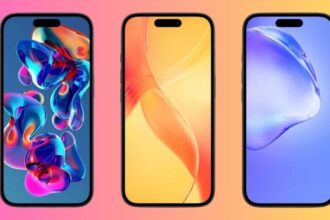
Apple has rolled out iOS 26 with new design elements and yes, fresh stock wallpapers are part of the package. If you want to give your iPhone a crisp, modern look, you can download the official iOS 26 wallpapers in free 4K resolution below.
What’s New in the iOS 26 Wallpaper
Apple’s iOS wallpapers usually reflect subtle design philosophies:
- Gradient Fusion: Smooth blend of colors inspired by molten glass textures.
- Dynamic Support: Light and Dark variants automatically adapt to system mode.
- 4K Quality: Optimized for edge-to-edge OLED displays on newer iPhones.
This makes the iOS 26 stock wallpaper perfect for showing off your screen’s sharpness.
Download Official iOS 26 Wallpapers for iPhone
Choose your favorite and set it in Light or Dark Mode for both your Home Screen and Lock Screen.
1. Sky

2. Shadow

3. Halo

4. Dusk

How to Set iOS 26 Wallpaper on iPhone
- Open the Settings app on your iPhone.
- Tap Wallpaper → Add New Wallpaper.
- Browse and choose the iOS 26 wallpaper from your Photos library.
- Decide if you want different images for your Lock Screen and Home Screen.
- Adjust the wallpaper using Depth Effect or Perspective Zoom if desired.
- Tap Add to apply your changes.

💡 Tip: You can also long-press on the Lock Screen, swipe to add a new wallpaper, and choose the downloaded image.
Compatible Devices
These wallpapers are not limited to the iPhone 16 lineup. You can set them on:
- iPhone 16, 16 Plus, 16 Pro, 16 Pro Max
- Older models running iOS 26
- iPad models (though aspect ratio may vary)
Other Ways to Customize Your iPhone ( iOS 26 )
Pair your new wallpaper with these personalization features for the ultimate iOS 26 experience:
- Lock Screen widgets for instant access to your most-used apps.
- StandBy Mode for a smart, glanceable charging display.
- Custom app icons for a themed Home Screen that matches your wallpaper.
- Liquid Glass Wallpapers for a cohesive, futuristic iPhone look.
Bring the iOS 26 Look to Your iPhone
The iOS 26 wallpapers aren’t just backgrounds—they’re a visual upgrade that instantly refreshes your iPhone. With abstract color blends, minimalist depth, and adaptive light/dark designs, they reflect Apple’s evolving design philosophy.