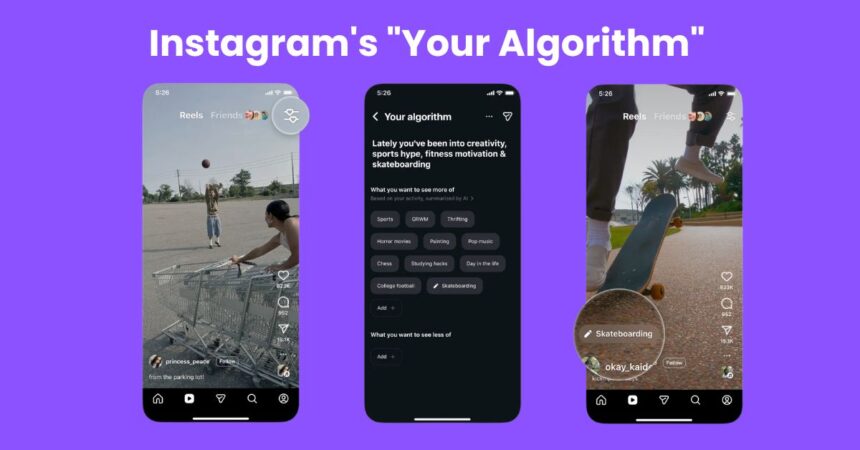
Instagram used to feel like a mystery box. You open Reels, scroll for a few minutes, and wonder why the app keeps showing cooking hacks when you only watched one pasta video at 2 AM. The new Your Algorithm feature finally pulls back the curtain and lets you see what Instagram thinks about you. More importantly, it lets you change it.
This tool started rolling out in December 2025 and is slowly reaching users across the world. It lives inside the Reels section and works like a control panel for your interests. Instead of silently guessing what you like, Instagram now shows the topics shaping your feed and gives you buttons to adjust them instantly.
What Is the “Your Algorithm” Feature on Instagram?
Instagram collects signals from what you watch, how long you watch, what you like, and what you skip. The Your Algorithm page turns those signals into clear topic labels like travel photography, fitness motivation, book reviews, or comedy skits.
You are no longer stuck with whatever the app decides. You can tell Instagram to show more of something or quietly remove topics you never cared about. It is one of the biggest steps Instagram has taken toward algorithm transparency.
How to Access and Use the Your Algorithm Feature on Instagram
Below is a simple and easy path you can follow on your phone. Each step is written exactly how a normal user would do it.
Part 1: How to Open the Your Algorithm Feature
Before you can customize anything, you need to reach the control panel hidden inside Reels. These first steps help you locate the feature quickly without digging through settings.
- Open Instagram and tap the Reels tab at the bottom.
- Look at the top right corner of the Reels screen.
- Tap the icon with two lines and small hearts.
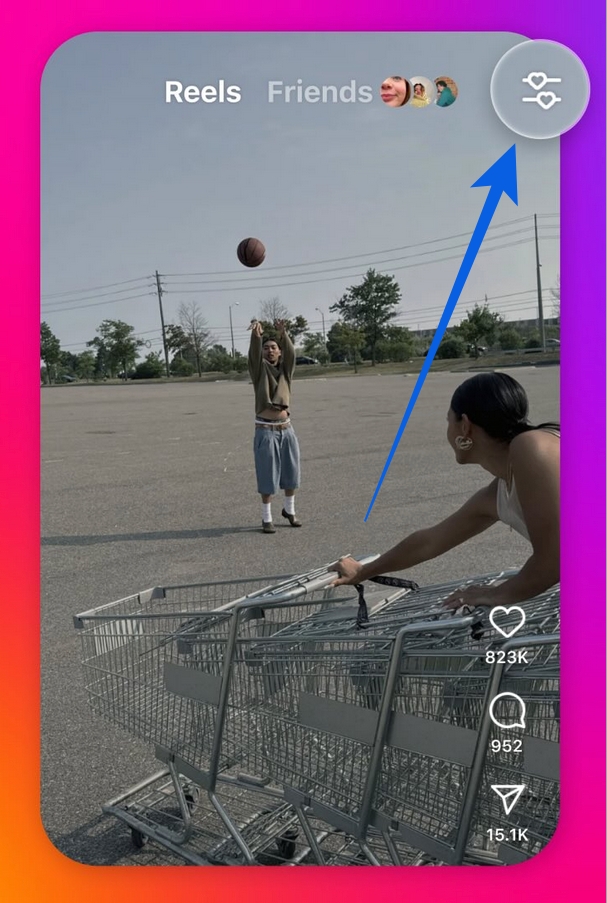
- The Your Algorithm page will open.
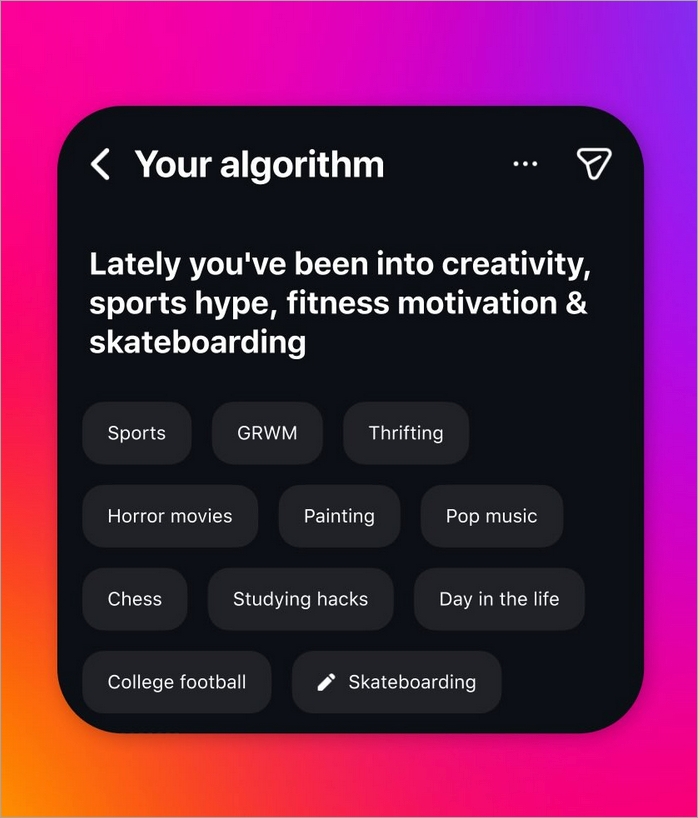
Part 2: How to Read and Understand Your Algorithm Data
Once the page opens, take a moment to read what Instagram has already learned about you. This screen explains the two lists that decide what appears in your Reels feed.
- You will see two lists on the screen.
- What You Are Into shows topics Instagram thinks you like.
- What You Do Not Want to See shows topics you rejected.
Part 3: How to Edit and Reset Your Interests
Now comes the important part where you actually shape your feed. The following steps show how to remove unwanted topics and add the ones you truly care about.
- Press and hold any topic you want to change.
- Tap Move to not interested to reduce that topic.
- Tap Watch more if you are not sure yet.
- Tap Remove to delete it fully.
- Use the Add button to type your own topic.
That’s it, your feed gets updated immediately after making the changes.
How to Share Your Algorithm on Instagram Story
If you want to join the viral trend, you can turn your algorithm into a Story post. These steps guide you from the settings screen straight to the Story editor.
- Stay on the same page and tap the arrow icon on top.
- The Story editor will open with your topics.
- Add colors, text, stickers, or a photo background.
- Tap Share to Story or save it to post later.
How to Train Your Instagram Feed After Editing Your Algorithm
Changing topics is only half the job. For the best results, you should guide Instagram with your daily behavior using the simple actions below.
- For the next few days, watch Reels you like completely.
- Save a few good Reels from your favorite topics.
- Tap Not Interested on videos you dislike.
- Skip unwanted videos within the first seconds.
- Come back to this page after a week and adjust again.
This process works the same on Android and iPhone, and the changes start working immediately. Check out how to reset Instagram Algorithm for a detailed guide on it.
Why the Your Algorithm Feature Matters for Your Instagram Feed
For years, algorithms felt like invisible forces. If your feed turned strange, the only solution was to like and skip videos for weeks, hoping it would fix itself. Now you get a direct reset button.
It is especially useful when your interests change. Maybe you moved from gaming content to career advice, or from beauty videos to fitness. Instead of waiting for the app to notice, you can tell it in seconds.
Instagram also says this is just the first step. Right now, the tool works only inside Reels, but similar controls are planned for Explore and other parts of the app.
Your Algorithm Feature Not Showing? Here’s What to Do
The rollout is still phased. Even with the latest app version, many users on Android and iPhone do not have it yet. Instagram is expanding it gradually to English speaking regions first.
If the icon is missing, keep checking after updates or try opening Reels from a friend’s story who has shared their algorithm. Some users can access it through that shortcut.
Final Thoughts
Your Algorithm makes Instagram feel less like a stranger and more like a space you actually own. It does not replace the algorithm, but it gives you a steering wheel. If your Reels feed has ever felt noisy or random, this is the cleanest way to fix it without starting a new account.
Open Reels, tap the icon, and teach Instagram who you are in 2026.