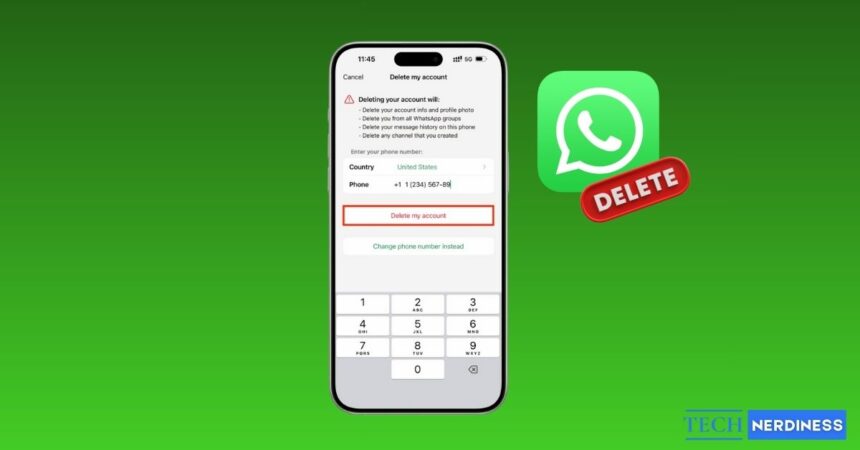
Deciding to leave WhatsApp is a pretty big move. Maybe you are done with the privacy concerns, or maybe, like me, you just need a serious break from the constant pinging. Either way, the process can be surprisingly confusing because the app does not offer a simple “log out” button.
In this guide, I will walk you through your options. You will learn how to permanently delete your WhatsApp account and also see a few temporary alternatives if you just need a break without cutting ties completely.
Delete vs. Deactivate vs. Uninstall WhatsApp
Before you start tapping buttons, let’s make sure everything is clear. Many people uninstall the app thinking their account is gone, only to realize later that they are still part of every group chat.
- Uninstalling WhatsApp: This only removes the app from your phone. Your account stays active, and your data remains on WhatsApp’s servers.
- Deleting your Account: This is the permanent option. It removes your message history, group memberships, and backups tied to your account.
Can You Deactivate WhatsApp Temporarily?
No. WhatsApp does not offer a deactivate feature like Facebook. That said, there are a few workarounds that come close, which I will cover later.
| Feature | Uninstall App | Delete Account |
|---|---|---|
| Account Status | Active | Permanently deleted |
| Chat History | Saved (if backed up) | Erased |
| Group Membership | You remain in groups | You are removed |
| Reversible? | Yes | No |
What Happens When You Delete Your WhatsApp Account?
If you decide to delete your account, here’s exactly what happens.
- Chats and Groups: Your entire message history is deleted, and you are removed from all WhatsApp groups.
- Cloud Backups: Any backups stored on iCloud or Google Drive are deleted.
- Payments and business data: Payment details and WhatsApp Business information linked to your account are erased.
- Data removal timeline: You lose access immediately, but it can take up to 90 days for WhatsApp to fully remove your data from backup systems.
- Your Friends: Your profile photo disappears, and you no longer show up in your contacts’ WhatsApp lists.
Things to Do Before Deleting WhatsApp (Do Not Skip This)
Deleting an account too quickly can lead to regrets. Here are a few smart steps to take first.
- Back Up Locally: Even if you are leaving, save a local copy on your computer if possible.
- Export Important Chats: I usually email myself specific conversation threads (like chats with family), so I have a readable copy.
- Remove 2FA: If you use WhatsApp to get login codes for other apps, change those settings immediately.
- Tell People: Send a quick “I’m leaving” text to your close friends so they know how to find you.
How to Delete Your WhatsApp Account on iPhone
If you are using an iPhone, follow these steps carefully.
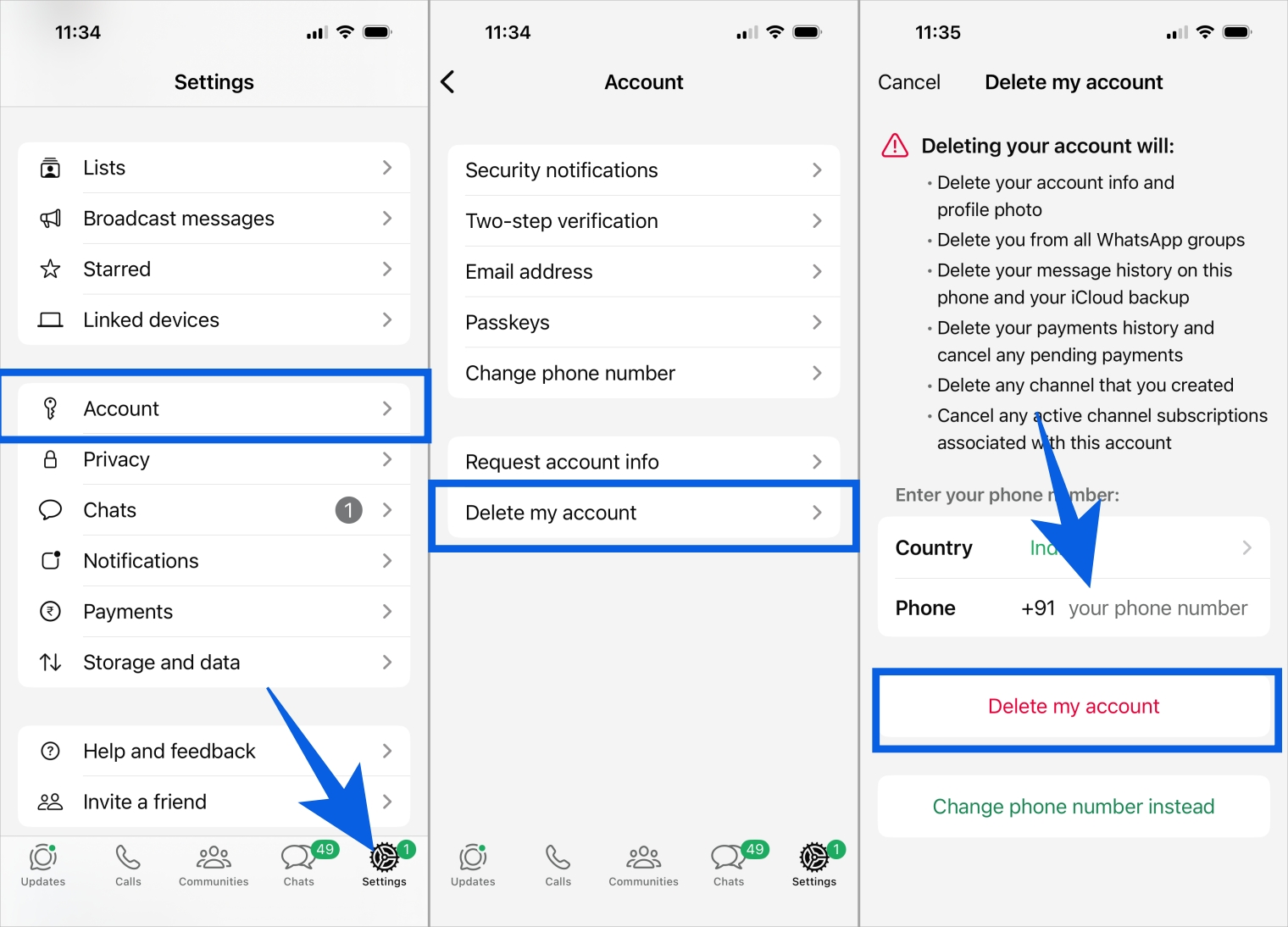
- Open WhatsApp and tap Settings in the bottom corner.
- Go to Account and tap Delete my account.
- Enter your full phone number to confirm your identity.
- Choose a reason for leaving if prompted, or tap Delete my account again.
- Confirm the final warning to complete the process.
One more thing to check: review your Apple ID subscriptions. If you paid for third-party tools or WhatsApp Business features, deleting the app will not cancel those charges.
How to Delete Your WhatsApp Account on Android
The steps on Android are very similar.
- Open WhatsApp and go to Settings.
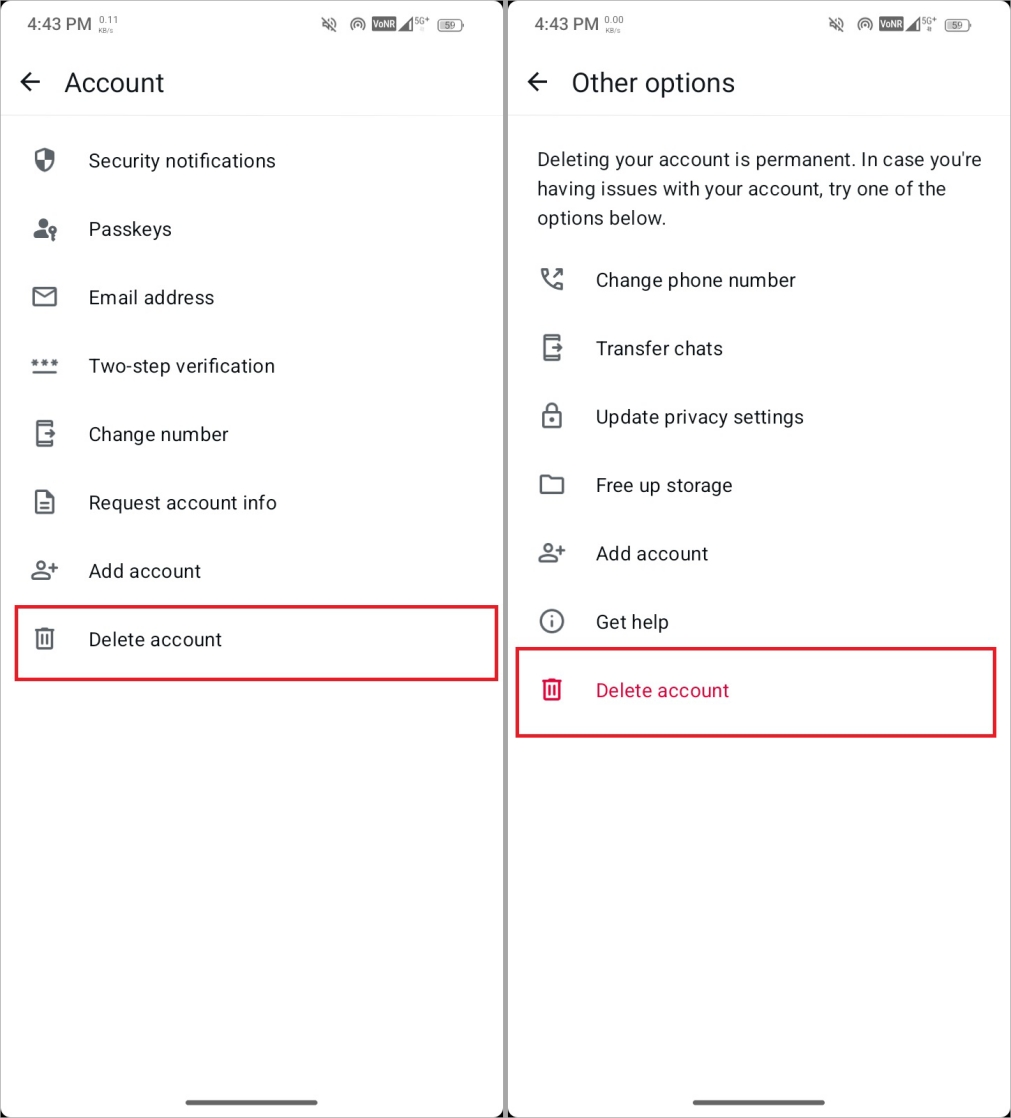
- Tap Account, then select Delete Account.
- Enter your phone number.
- Tap the red Delete Account button.
- Dual-SIM Phones: Make sure you enter the number for the account you want to delete, not just the one that provides your data.
Dual SIM phones: Make sure you enter the number linked to the WhatsApp account you want to delete, not just the SIM used for mobile data.
Important note: If your SIM card is lost or inactive, you may not be able to receive a confirmation message if WhatsApp requests one.
How to Temporarily Stop Using WhatsApp Without Deleting Your Account
If you are just feeling overwhelmed, these options are often better than deleting everything.
- Kill Notifications: Go to your phone’s main Settings > Apps > WhatsApp and turn off “Show Notifications.” Silence is golden.
- Stop Background Data: In that same menu, stop WhatsApp from using data in the background. You won’t get messages until you actually open the app.
- Archive Everything: I like to archive all my chats and mute groups. It clears the screen without deleting anything.
- Log Out of Web: If you use WhatsApp on your laptop, go to Linked Devices and log out of all sessions so you aren’t tempted to check.

This is a solid approach for a short digital detox if you think you might return later.
Can You Recover a Deleted WhatsApp Account?
This is the most common panic question, and the answer is straightforward.
- You can sign up again: Using the same phone number is allowed, but you start fresh.
- There is no undo option: Once the account is deleted, the action is immediate.
- Backups cannot be restored: Since cloud backups are removed, you cannot recover old chats.
- It is permanent: Getting old messages back after deletion is nearly impossible.
If you want to explore recovery options, you can check our guide on how to recover deleted WhatsApp messages.
Common Problems When Deleting WhatsApp and How to Fix Them
If something goes wrong, it is usually due to one of these issues.
- Cannot find the delete option: Update WhatsApp. Older versions may place the menu elsewhere.
- Phone number errors: Include your country code, such as +1 or +44, and do not add leading zeros.
- App freezing or crashing: Restart your phone or clear the app cache on Android.
- App icon still visible: Deleting your account does not remove the app. Uninstall WhatsApp to remove the icon.
Final Thoughts: Should You Delete WhatsApp or Just Take a Break?
Taking control of your data can feel empowering, but pause for a moment before deciding. If privacy concerns are your main issue, deleting your account makes sense. If you are simply tired of constant notifications, muting or uninstalling the app may be enough.
Choose the option that fits your situation, without pressure.
Yes. You will be removed, and groups will see a message saying “You left.”
There is no notification, but your profile photo disappears, and messages sent to you will show only one checkmark.
Usually no. You need access to the app. If your phone is lost, you must contact WhatsApp support to request deactivation.
WhatsApp may retain limited logs for legal reasons, but your personal information and message history are removed from active servers.