Telegram lets you connect easily with people, but when it comes to finding someone by their username, it can be a tedious task for new users. I’ve been using Telegram for years across multiple devices, and this is one of the most common questions that new Telegram users ask.
Usernames are Telegram’s unique identifiers that let you add contacts without sharing your phone number to maintain privacy. This is one of the biggest features that makes Telegram different from other messaging apps. You can connect with anyone globally without exposing your personal information to others.
In this guide, you’ll learn exactly how to add someone on Telegram using their username and different tips to manage your contacts and privacy settings effectively.
What Is a Telegram Username and How Does It Work?
A Telegram username is a unique identifier that begins with the @symbol. It is more like a handle on X (Twitter) or Instagram. For instance, mine is @techwriter_sajid, and you won’t find anyone else with that exact combination.
Your username must be unique across the entire platform, unlike your display name, which anyone can duplicate. Setting up a username is optional on Telegram, but having one can make it much easier for people to find you and contact you without sharing your phone number.
Why Add Someone on Telegram Using a Username Instead of a Phone Number?
1. Privacy Protection
When you add someone by username, your phone number always stays hidden unless you choose to share it. I use this feature constantly when connecting with my readers or other professional contacts since I also do a lot of freelance design work. This keeps my phone number hidden while staying connected with them.
2. Convenience
The best part is that usernames work across all devices instantly, and you don’t even need to save any contacts to your phone, sync anything, or worry about any country codes. Simply type the username and start chatting right away.
3. Cross-Platform Sharing
You can share usernames anywhere, whether it’s in emails, websites, social media bios, and more. I have my Telegram username in my author bio, and people can simply click it to start messaging me right away.
How to Add Someone on Telegram by Username
I’ve used all three methods below on both the iPhone and Android, the web, and the desktop app. And to your surprise, they all work identically across platforms.
Method 1: Search for a Username in Telegram
This is the best and fastest method that I often use.
- Open Telegram and tap the search icon (magnifying glass) at the top of your chats list.
- Type the username exactly as it appears. You may or may not include the @ symbol. For example, if someone’s username is techfan12, type techfan12 or @techfan12.
- Telegram will show matching results as you type. Look for the “Global Search” section. Tap on the correct profile when it appears.
- A chat window will open with the selected contact.

You can tap on their contact name to see their profile picture, username, and bio (if they have one) to verify if they’re the right person. Once you message them, the contact will be added to your list automatically. I appreciate that Telegram doesn’t have that separate Add Contact step.
Method 2: Add Someone Using a Telegram Username Link
This is perfect when someone shares their username as a clickable link. You can format Telegram usernames as links using t.me/username or https://t.me/username.
- Click or tap the link from wherever you received it (email, website, text message, etc.).
- Your device will ask if you want to open the link in Telegram or not.
- Tap Open or Yes, depending on the device. The profile will open in the Telegram app or on the website.

- Tap the message box to start chatting. Or if it’s a community or channel, you’ll see the Join button.

I use this method constantly when people share their Telegram contacts on different websites.
Method 3: Add a Username from a Telegram Group or Channel
If you find someone interesting in a group discussion or channel, this method can be useful.
- Open any group or channel where the person is a member.
- Find one of their messages.
- Tap on their name or profile picture. Their profile page will open.
- Tap Message to open a private chat.

You wouldn’t believe how many times I’ve used this in the tech and design groups, and especially during the good old custom ROM days, ten years ago. I’d usually ask them for advice or some follow-up questions privately.
How to Find Someone’s Telegram Username
- Ask directly: Believe it or not, this is the simplest option. Just ask them to share their Telegram username. Most people know their username, and they’ll share theirs within seconds.
- Social media profiles: Many people list their Telegram username on their bios in LinkedIn, Instagram, X (Twitter), and many other platforms. This is where most Telegram users promote their handles.
- Website/email signatures: Some businesses and creators often include them in their website footer, blog posts, or their About & Contact pages. So make sure you don’t miss out on those.
- Groups and channels: You can often find usernames in the members list or in the comments of a community.
What Happens If Someone Does Not Have a Telegram Username?
Well, here’s the catch! Not everyone sets up their username. If someone doesn’t have one, you’re left with three options:
- Ask them to create one; it literally takes less than 30 seconds.
- Get their phone number (if they’re comfortable sharing it) and add them through your phone contacts. Telegram will show them in your app once they’re in your phone’s contact list.
- Have them send an invite link to their profile, which they can generate by going into Settings or their profile.
Why You Cannot Find Someone on Telegram by Username and How to Fix It
- Username Typed Incorrectly: Usernames are case-insensitive, but spelling matters. Make sure you’re using the exact username and also ensure that you don’t miss that extra underscore if it’s there.
- Privacy Settings: The person might have restricted who can find them by username in their privacy settings, so they’ll have to add you by themselves. To do so, approach them directly or mention them in the group or comments if you exist in the same group.
- Username Changed or Removed: People can change their username any time. If you can’t find someone, ask them to confirm their current username.
- Account Deactivated: If someone deleted their Telegram account, their username becomes available for others to claim. So double-check that you’re chatting with the right person or not.
Telegram Username vs Phone Number vs Invite Link: What’s the Difference?
- Username: It’s public, searchable, and doesn’t require contact saving. It’s perfect for professional connections or anyone who wants to be easily reachable without sharing personal information.
- Phone number: It’s private and requires saving to contacts first. You can use this for close personal contacts where you want their full contact information synced.
- Invite link: It’s either a one-time or a permanent link for groups/channels. Best for inviting multiple people to the same group. If you’re searching for the invite icon, you can learn about different Telegram icons and symbols in our guide on what icons and symbols mean on Telegram.
How to Create a Telegram Username for Your Account
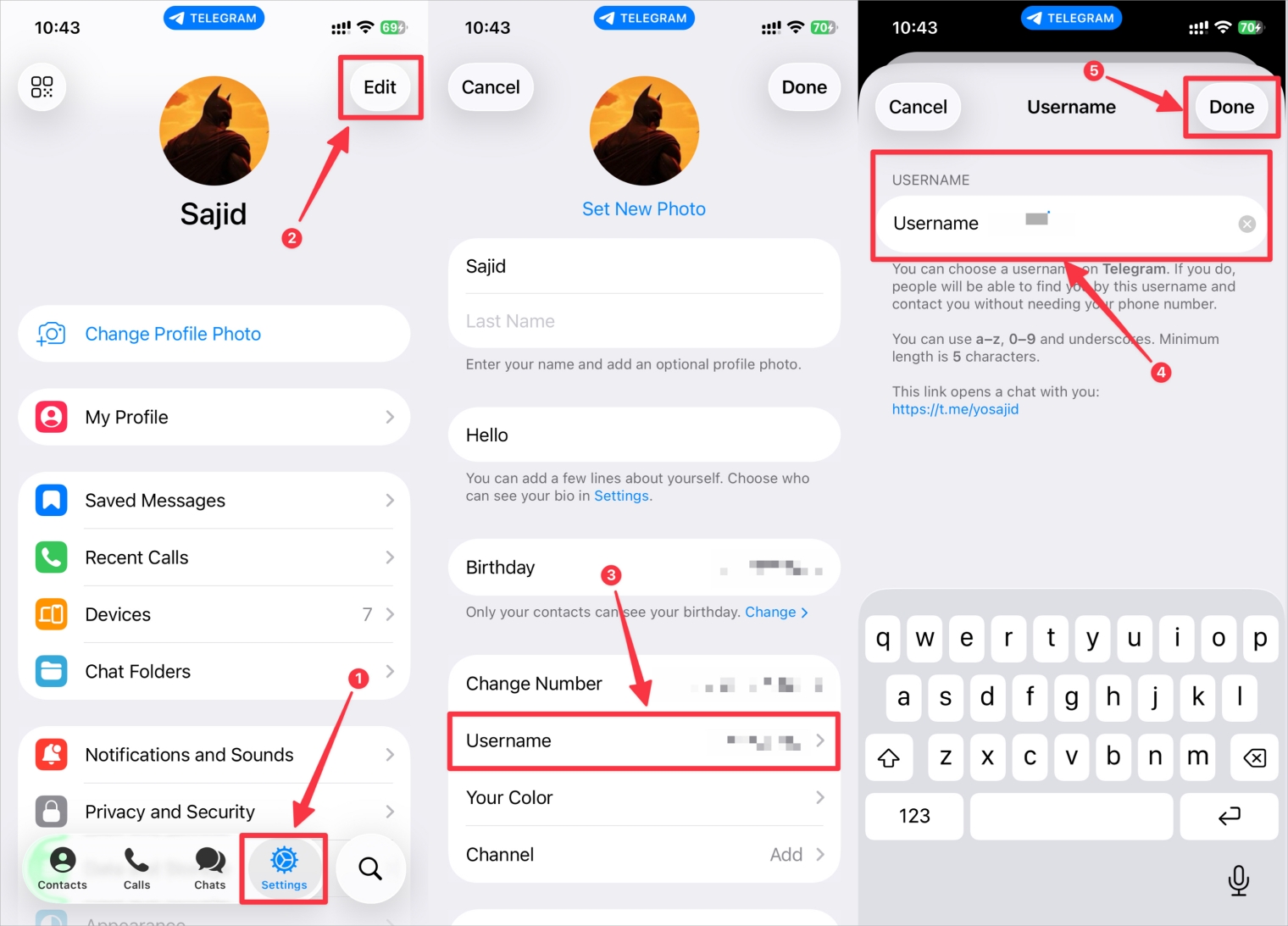
Setting Up Your Username
- Open Telegram and tap the menu (three horizontal lines) if it’s on the desktop.
- Go to Settings, then tap My Profile.
- Tap Edit.
- Tap Add Username. If you already have a username set up, just tap your username.
- Type your desired username. Telegram will tell you immediately if it’s available.
- Tap Done, Save, or the checkmark/tick.
Best Practices for Choosing a Telegram Username
Keep your username simple and memorable. I’d recommend avoiding numbers and special characters unless it’s absolutely necessary. You want to ensure that it’s recognizable by using your name, nickname, or something that represents you, like your brand or interests.
If you’re using Telegram for your work, Sarah_Marketing sounds much better than CrazyCatLady420 in a business context. If possible, check if the username is also available on other social media platforms, so people can find you anywhere with the same handle, and you maintain consistency.
Privacy and Safety Tips When Using Telegram Usernames
If you have a public username, that means anyone can find and message you. But you can even control who can message you by going to Settings > Privacy and Security. Even if you have a public username, you can restrict messages to only your contacts and prevent people from adding you to groups without your permission.
Your phone number is always private, even if you have a username, since these two are completely separate. And this is more of a reason why Telegram is known for privacy.
How to Manage Telegram Contacts Added via Username
View and Organize Contacts
Telegram organizes your contacts automatically. If you have messaged anyone, they’ll appear in your chat list. And to see all the contacts at once, just go to Contacts in the main menu.
You can organize them into folders like Personal or Tech Communities. As a result, you’ll find everything organized, especially when you have a lot of connections with many people through their usernames.
Delete or Block Someone
In case you want to remove someone you added by their username, simply open their chat, tap their name at the top, scroll down, and select the Delete Chat option.
On the other hand, to block someone, open their profile, tap the three dots, and select the Block User option. And if you’re going to take drastic action, you can learn how to delete your Telegram account completely.
Tips to Use Telegram Usernames More Effectively
- Share your username in your email signatures to ensure that clients or colleagues can reach out to you easily. I added mine in my email signature, and I’ve received many messages from my professional contacts.
- When sharing your username online, write it as t.me/yourusername with URL formatting to create a clickable link that will directly open your chat in their Telegram app.
- Always remember that Telegram won’t preserve your usernames for centuries. If you want a specific username for a project or business, go ahead and register now.
- It’s a good practice to test your username by searching it yourself on a different device with a different account. Or if you have friends, you can ask them to try your username.
Final Thoughts
It’s a straightforward process when you want to add someone on Telegram once you know the steps. Since I’ve used Telegram all these years on multiple devices, I know the ins and outs of it, and these steps will work reliably irrespective of the platform or the app.
That being said, usernames are one of the best features of Telegram. They give you control over your privacy while making it easy to connect with people globally. So what are you waiting for? Go ahead and set up your Telegram username right away, if you haven’t already, and start using it as your primary way to connect on Telegram.