



Instagram changes small things all the time. Icons move around, buttons shift places, and new symbols quietly show up. Recently, many people started noticing a tiny clock icon on some Story rings in the top Stories bar. It appears without any pop-up or explanation, so it is natural to wonder what Instagram is trying to tell you.
If you are wondering too, here’s what the time icon on Instagram stories actually means.
What Is the New Instagram Timer Symbol?
The timer symbol is a small clock that appears on the bottom right of a profile picture in the Stories row. When it shows up, Instagram is hinting that the Story is close to disappearing. Stories still last 24 hours before they vanish unless the creator saves them to Highlights. The timer works as a heads-up that one of those Stories is reaching the end of its 24-hour window.
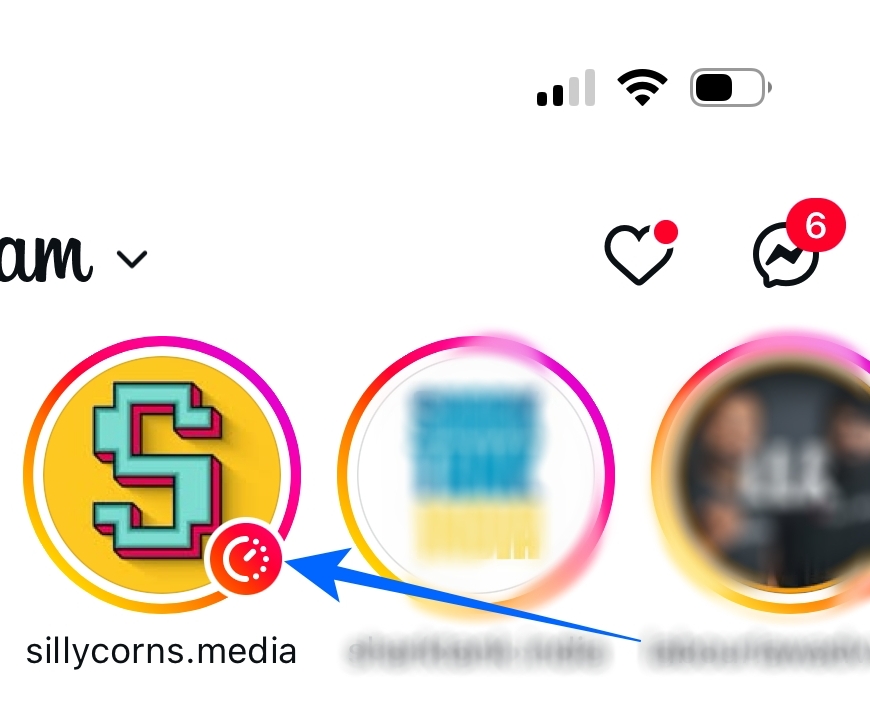
There is no countdown you can tap and no exact time displayed. Instagram hasn’t revealed how many minutes or hours are left when the clock icon appears, which is why it can feel mysterious when you first notice it.
Also read: How to Turn Off Vanish Mode on Instagram
What Does the Timer Symbol on Instagram Stories Mean?
The timer simply means the Story will expire soon. It is Instagram’s way of saying that if you want to watch it before it disappears, you should open it now.
Not every user sees the icon yet. Instagram often rolls out features gradually, so some people notice it frequently while others never see it at all. Region, app version, and user engagement patterns seem to influence how often it appears. Even if the timer shows up for you, it might appear only on a few accounts, usually the ones you interact with the most.
Why Instagram Added the Timer Symbol
Instagram has always relied heavily on engagement. Stories are one of the features that keep people tapping and checking throughout the day. When you see a Story that is about to expire, you are more likely to watch it immediately rather than letting it slip away. The timer helps prevent those moments where you realize you missed something you actually wanted to see.
For creators, this tiny icon can create a second wave of engagement. A Story gets attention when it is first posted, then gets another spike when it is close to disappearing. Creators can even track how view counts change as the 24-hour mark approaches.
Related: How to See Who Clicked Your Link on Instagram Story?
How to Know When an Instagram Story Is About to Expire
If the timer icon appears on someone’s profile picture in the Stories bar, that means one of their active Stories is nearly at the 24-hour limit. Even though Instagram never displays the exact remaining time, the indicator shows that if you plan to watch it, you should do so before it is gone for good.
It’s especially useful for:
- Limited‑time announcements
- Flash sales
- Event updates
- Personal moments that won’t be saved in Highlights
Final Thoughts
The timer symbol on Instagram Stories is simply a reminder that a Story is about to disappear. It has nothing to do with privacy, screenshots, or hidden viewer information. It is just a small nudge to view a Story before the 24-hour window ends.
Instagram is still refining the feature, and more users will likely see it as updates roll out. Keeping your app updated ensures you get these small but helpful additions as soon as they become available.
FAQs
No. The icon doesn’t track or expose anything. It only signals that a Story is about to expire.
No. There is currently no option to disable it. It is displayed automatically when Instagram chooses.