Boomerang videos first entered the spotlight in 2015, when Instagram launched its standalone Boomerang app, letting users create short clips that play forward and backward in a smooth loop. Since then, this playful video style has become a staple across social platforms, and Snapchat is no exception.
If you want to recreate the same looping effect on Snapchat, you do not need any third-party apps. Snapchat offers built-in tools that make it easy to capture boomerang-style videos in just a few taps. Keep reading to learn how to do a boomerang on Snapchat.
What Is a Boomerang on Snapchat?
A Boomerang on Snapchat is a short video that plays forward, then backward, in a continuous loop. It turns a quick moment into a repeating animation, making simple actions look more engaging and fun.
Snapchat does not label this feature as “Boomerang.” Instead, it uses the Loop tool to create the same effect.
How to Make a Boomerang Video on Snapchat
Creating a Boomerang on Snapchat only takes a few seconds. All you need to do is record a short video and apply Snapchat’s Bounce effect, which makes your clip play forward and backward in a continuous loop. Here’s how:
- Open the Snapchat app.
- Press and hold the Capture button to record a video Snap.
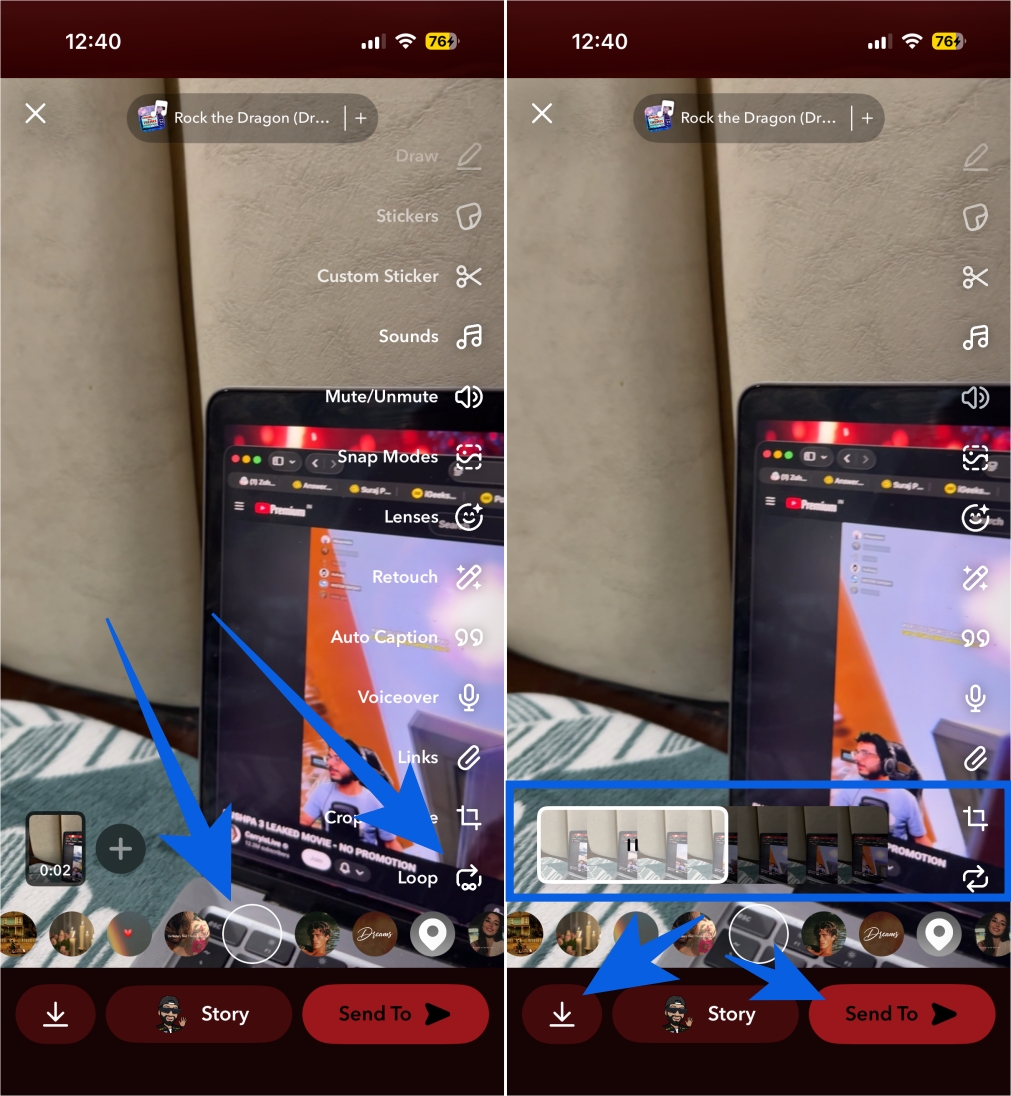
- Now, tap the Loop tool icon on the right vertical toolbar.
- Keep tapping it to cycle through its various functions and stop when you see the video play forward and backward (Bounce effect).
- Once done, a white marker will appear on the video’s timeline.
- Next, use the slider to select the part of your video you want to apply the Bounce effect to. The slider will only appear if the video duration is over 1 second.
- Once satisfied with the results, tap the Send button to share it as a Snap or Story or tap the Download button to save it to your Memories.
Tips to Make Your Snapchat Boomerang Look Good
While a Boomerang video looks simple, a few small tweaks can make a big difference. From clip length to lighting and movement, these tips help your Snapchat Boomerangs look cleaner, smoother, and more engaging.
- Keep it short: Record between half a second and two seconds.
- Use simple movement: Try waving, hair flips, door opens, coffee sips, or one step forward.
- Use bright lighting: Good light reduces blur and makes the loop smoother.
- Hold your phone steady: Shaky hands ruin the bounce effect.
Having Issues Making a Boomerang on Snapchat
If your Boomerang isn’t working as expected, try these quick fixes.
- Make sure you’re recording a video, not taking a photo. The Bounce effect only appears for video Snaps.
- Update Snapchat from the App Store or Play Store, as older versions may hide looping tools.
- Close Snapchat completely and reopen it to refresh the app.
- Clear the app cache by going to your Account Settings → Clear Data → Clear Cache. This often restores missing features.
- If your Boomerang looks choppy, move to a brighter area and hold your phone steady while recording.
- If only part of your clip loops, use the slider to manually select the portion you want to Bounce. Recording shorter videos usually gives smoother results.
Final Thoughts
That’s pretty much it. Now you know that making a Boomerang on Snapchat is simple once you know where to look. All you need to do is keep your clips short, use simple movements, and shoot in good lighting for the best results. Also, don’t forget to experiment with different actions and angles to make your Snaps more engaging.
Have questions or tips of your own? Join the discussion in the comments and help other readers get the most out of this feature.
Snapchat does not label it as “Boomerang,” but you can create the same effect using the Bounce option inside the Loop tool after recording a video.
Some Android devices only show basic looping. The Bounce effect is more consistent on the iPhone. If Bounce is missing on Android, you can create a Boomerang in another app and upload it to Snapchat.
This usually happens when you take a photo instead of a video, use an outdated app version, or face a temporary glitch. Record a short video, update Snapchat, or clear cache to fix it.
Not really. Most lenses add visual effects only. For true forward and backward looping, the built-in Bounce tool works best.