Have you noticed that your iPhone screen dims when you look away, or your alarm gets quieter the moment you pick it up? That is not random. It is Apple’s Attention Aware features at work.
These features come with Face ID and make your iPhone or iPad more responsive to you. With the TrueDepth camera, your device can tell if you are paying attention. It then adjusts brightness, hides or shows notifications, and even lowers sound levels based on your gaze. In this guide, you will learn what Attention Aware features are and how you can turn them on or off.
What Are Attention Aware Features?

Attention Aware features use the TrueDepth camera on Face ID–enabled iPhones and iPads to detect when you’re looking at the screen and adjust the device’s behavior accordingly.
Here is what it can do:
- Keep the screen on while you’re reading: No unexpected dimming or auto-lock.
- Hide notification previews until you look: Protects your privacy on the Lock Screen.
- Lower alert and ringer volume: Alerts feel less intrusive when you’re already holding the device.
These subtle adjustments make your iPhone or iPad feel more personal and intuitive. They add convenience, safeguard privacy, and can even help conserve battery life. Best of all, the feature only activates when needed, so it feels seamless, not forced.
Think of it as Apple’s take on Android’s “Smart Stay,” but with tighter integration, stronger privacy, and on-device processing.
How Do They Work on iPhone and iPad?
Attention Aware features rely on Apple’s TrueDepth camera system – The same technology that powers Face ID.
Here’s what happens behind the scenes:
- The TrueDepth camera projects thousands of invisible infrared dots to create a precise 3D map of your face.
- It then checks if your eyes are open and looking at the screen.
- The information is processed instantly by the Neural Engine, ensuring everything stays on your device. Nothing is recorded or sent to Apple’s servers.
This real-time detection allows your iPhone or iPad to know when you’re paying attention. Instead of storing your eye movements, it reacts immediately by:
- Keeping the display awake while you read
- Dimming the screen when you look away
- Lowering ringer and alert volume when you’re holding the device
The result is a smarter, more natural experience that feels seamless and respects your privacy.
Benefits of Attention Aware Features
- Better privacy: Your notification previews stay hidden until you look directly at the screen. This means sensitive information won’t pop up for others to see if your iPhone or iPad is sitting on a table or in someone else’s hands. Face ID ensures only you can unlock those details.
- Battery efficiency: The display automatically dims when you’re not looking, helping conserve battery life. While the TrueDepth camera does use a small amount of power to check for attention, the overall impact is minimal compared to the savings from reduced screen-on time.
- Improved usability: The screen won’t lock while you’re reading. Alarms and ringtones lower in volume when you’re actively holding the device. Accidental touches are reduced, since the device knows when your attention isn’t on the display.
- Accessibility benefits and limits: For some users, this features provide useful support, like keeping the screen unlocked longer and minimizing distractions. However, they may pose challenges for people with certain vision or mobility conditions, as the device relies on direct eye contact to stay active.
Devices That Support Attention Aware
Not every iPhone or iPad has this feature; it is exclusive to devices with Face ID.
Supported iPhones
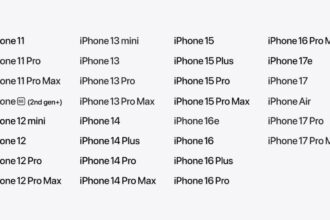
- iPhone X and newer (iPhone 11, 12, 13, 14, 15, 16 and 17 series)
- Not available on iPhone SE models
Supported iPads
- iPad Pro 11-inch (1st generation and later)
- iPad Pro 12.9-inch (3rd generation and later)
- iPad Pro 13-inch (6th generation and later)
Pro Tip: If you’re unsure which iPad Pro model you own, go to Settings → General → About and check the model name.
Supported iOS Version
- This functionality has been part of iOS since iOS 12 and continues to work in all recent versions. Apple has refined it over time, with improvements in iOS 17 and iOS 18 that make detection more accurate and reliable.
How to Enable or Disable Attention Aware Features on iPhone
- Open Settings on your iPhone or iPad.
- Scroll down and select Face ID & Passcode.
- Enter your passcode.

- Scroll to the section labeled Attention.
- Toggle Attention-Aware Features on or off.

That’s it! If disabled, your iPhone or iPad will no longer dim the screen, lower alerts, or hide notifications based on your attention.
Tip: In the same menu, you will see Require Attention for Face ID. This is slightly different; it makes sure your eyes must be open and looking at the device to unlock it. For better security, turn on both.
Common Issues and Troubleshooting
Sometimes, it might not behave as expected.
Here are common problems and fixes:
1. Screen Still Dims While You’re Looking
- Cause: The TrueDepth camera may be dirty or blocked.
- Fix: Gently clean the front camera area and make sure no case, dust, or screen protector is covering it.
2. Notifications Don’t Stay Hidden
- Cause: The Show Previews setting is set to Always.
- Fix: Go to Settings → Notifications → Show Previews → When Unlocked.
3. Sunglasses Interference
- Cause: Some sunglasses block infrared light, making it harder for the TrueDepth camera to detect your eyes.
- Fix: Try removing the glasses or adjusting your angle. If you frequently use sunglasses, consider whether this feature suits your workflow.
4. Low-light Environments
- Cause: The sensors may struggle in very dark rooms.
- Fix: Hold your device at a natural angle facing your eyes, or add some ambient light.
5. Occasional Performance Issues
- Cause: Software hiccups or outdated iOS versions.
- Fix: Restart your iPhone or iPad, and make sure you’re running the latest iOS update. If issues persist, reset Face ID under Settings → Face ID & Passcode and set it up again.
Pro Tip: Most issues are temporary and clear up after a restart or software update. If nothing works, contact Apple Support to rule out hardware problems.
What’s the Difference Between Face ID and Attention Aware?
It is easy to confuse the two, but they serve different purposes.
| Aspect | Face ID | Attention Aware Features |
|---|---|---|
| Purpose | Authentication | Usability & personalization |
| Examples | Unlocking iPhone, authorizing payments, signing into apps | Adjusting screen brightness, hiding notification previews, lowering alert volume |
| Hardware Used | TrueDepth camera | TrueDepth camera |
| Focus | Security | Interaction |
Privacy & Security: Should You Be Concerned?
Because Attention Aware rely on your eyes and face, it’s natural to wonder about privacy. Apple has designed these features with security and transparency in mind.
How Apple Protects Your Data:
- On-device processing: All detection happens locally on the Neural Engine. Nothing is sent to Apple’s servers.
- No tracking or storage: The system does not record or save your eye movements it only checks for attention in real time.
- User control: You can turn the features off anytime under Settings → Face ID & Passcode.
Safety of the TrueDepth Camera
The infrared technology used by the TrueDepth camera is low-output and completely safe for everyday use. It does not harm your eyes or skin.
Updates and Improvements
With recent iOS updates, including iOS 17 and iOS 18, these features have become more reliable across different lighting conditions and while wearing certain glasses.
If you’re highly privacy-conscious, you can disable the feature. But for most users, the benefits far outweigh the minimal risks.
Conclusion
Attention Aware features may work quietly in the background, but they have a big impact on how natural your iPhone or iPad feels. Whether it’s keeping the screen awake while you read, lowering alert volume, or protecting sensitive notifications, these subtle touches make your device smarter and more personal.
If you haven’t explored them yet, go to Settings → Face ID & Passcode and give them a try. You might be surprised at how much more “aware” your iPhone feels once these features are working for you.
FAQs
Yes. Apple processes all facial recognition and attention data directly on your device. Nothing is stored or uploaded to Apple servers. The TrueDepth system only checks for attention in real time; it does not record or track eye movement.
No. Only iPhones with Face ID support. That includes iPhone X and later models (except SE models). iPads with Face ID, like the iPad Pro 11-inch and 12.9-inch, also support it.
This usually happens when the TrueDepth camera is blocked or dirty, you are wearing sunglasses that interfere with infrared light, or you are in a low-light environment. In most cases, simply cleaning the front camera area or adjusting your notification and preview settings can resolve the issue.
Not noticeably. The TrueDepth camera uses minimal power, and the battery saved from dimming the screen when you’re not looking generally outweighs the small usage.